Forum Discussion

Sumproduct or array formulas - Help
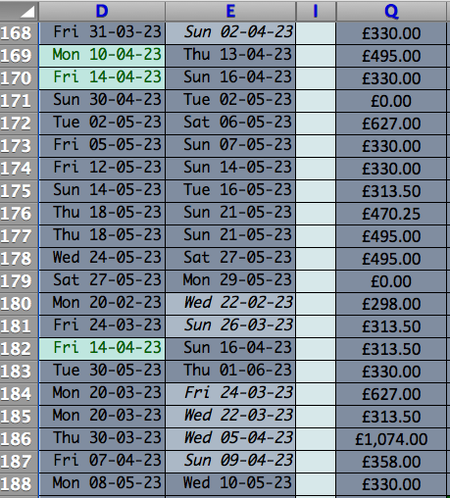
- Apr 11, 2023
A) One way to sum the elements in column Q based on a date range in columns D and E is to use the SUMPRODUCT function. This function allows you to sum the values in a column based on multiple criteria. Here’s an example formula that sums the values in column Q if the dates in column D are greater than or equal to a start date and the dates in column E are less than or equal to an end date:
=SUMPRODUCT((D:D>=start_date)*(E:E<=end_date)*(Q:Q))
In this formula, start_date and end_date are the dates that define your date range. Make sure to replace them with the actual dates or cell references that contain the dates.
B) To sum the elements in column Q based on two different date ranges, you can use two SUMPRODUCT functions and add them together. Here’s an example formula that sums the values in column Q if the dates in columns D and E fall within either of two date ranges:
=SUMPRODUCT((D:D>=start_date1)*(E:E<=end_date1)*(Q:Q))+SUMPRODUCT((D:D>=start_date2)*(E:E<=end_date2)*(Q:Q))
In this formula, start_date1, end_date1, start_date2, and end_date2 are the dates that define your two date ranges. Make sure to replace them with the actual dates or cell references that contain the dates.
I hope this helps!

A) One way to sum the elements in column Q based on a date range in columns D and E is to use the SUMPRODUCT function. This function allows you to sum the values in a column based on multiple criteria. Here’s an example formula that sums the values in column Q if the dates in column D are greater than or equal to a start date and the dates in column E are less than or equal to an end date:
=SUMPRODUCT((D:D>=start_date)*(E:E<=end_date)*(Q:Q))
In this formula, start_date and end_date are the dates that define your date range. Make sure to replace them with the actual dates or cell references that contain the dates.
B) To sum the elements in column Q based on two different date ranges, you can use two SUMPRODUCT functions and add them together. Here’s an example formula that sums the values in column Q if the dates in columns D and E fall within either of two date ranges:
=SUMPRODUCT((D:D>=start_date1)*(E:E<=end_date1)*(Q:Q))+SUMPRODUCT((D:D>=start_date2)*(E:E<=end_date2)*(Q:Q))
In this formula, start_date1, end_date1, start_date2, and end_date2 are the dates that define your two date ranges. Make sure to replace them with the actual dates or cell references that contain the dates.
I hope this helps!

Thak you very much. Much appreciated.