Forum Discussion

Summing values based on Condition
 DeletedJul 26, 2022
CHende77
Hi,
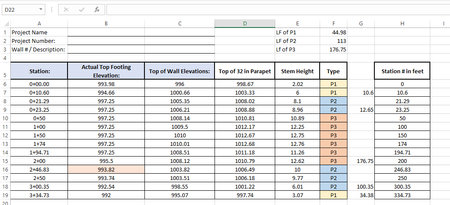
based on the example you provided you could try to replicate your result by using this formula:
Formula for cell G6:
=IF($F6<>$F7;IF($F6<>$F7;$H6;0)-IF(ISNUMBER($G5);SUM($G$5:$G5);0);0)
Then copy & paste the formula down to the last row of your table.
Now this should work, if you don't change the layout of the sheet.
To return the sum for each type you could try this:
Formula for cell F1 (copy & paste to cell F2 and cell F3):
=SUMIF($F$6:$F$19;MID($E1;FIND("P";$E1;1);LEN($E1)-6);$G$6:$G$19)
Now here you need to reshape the cell ranges (underlined in the formula above) based on the range of your table. For example if your table ranges from row 6 to row 25 you would exchange all 19's in the formula with a 25.
Hope it helps.
CHende77
Hi,
based on the example you provided you could try to replicate your result by using this formula:
Formula for cell G6:
=IF($F6<>$F7;IF($F6<>$F7;$H6;0)-IF(ISNUMBER($G5);SUM($G$5:$G5);0);0)
Then copy & paste the formula down to the last row of your table.
Now this should work, if you don't change the layout of the sheet.
To return the sum for each type you could try this:
Formula for cell F1 (copy & paste to cell F2 and cell F3):
=SUMIF($F$6:$F$19;MID($E1;FIND("P";$E1;1);LEN($E1)-6);$G$6:$G$19)
Now here you need to reshape the cell ranges (underlined in the formula above) based on the range of your table. For example if your table ranges from row 6 to row 25 you would exchange all 19's in the formula with a 25.
Hope it helps.
 CHende77Jul 26, 2022Copper ContributorThanks a bunch, very nice solution!