Forum Discussion

Summing (SUMIFS) with a Pivot Table and Manual Table. Easier Method?
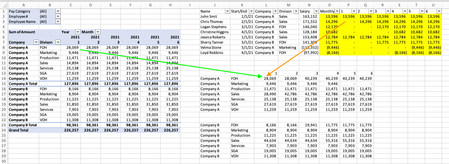
- Jul 11, 2021
I would suggest you spend a few minutes reading Merge, Join, Append, Combine as nowhere in what I shared there's a merge between the 2 tables/queries, hence your questions
Assuming you used the same tables names in Excel (RawData & Inputs)
And you can select Inputs as First table and RawData as Second table, that doesn't matter in this scenario

Second question. In my example I simplified it. In my real model I have two manual tables. One does salary and second does taxes paid by company. Can it still work with using the original Pivot, my salary forecast, and then my second tax forecast manual table?

- Jpalaci1Jul 10, 2021Brass Contributor
I have questions on how to complete what you did.
Did you just load the data or create a table (input table) from my manual inputs? Did you load into the data model or PQ?
My columns from my raw data and my manual inputs columns are not the same and not sure how I handle in Power Pivot like you did for the summary. How did you complete that?
I needed to make a second taxes table to include for a second table. Since a new salary triggers a tax is it best to just have some how to see if there's a salary make a line that multiples by the 25% tax rate? I just want to be able to load into a single summary like you have because my real raw data has both salaries and taxes so I can switch around. I don't know how to do the same for the forecasted costs. For example, in the input table you have just automatically see it's a salary account and create a new line that does the salary*25%.
Thank you for any help.
- LorenzoJul 10, 2021Silver Contributor
Let's go 1st step at a time if you don't mind
1/ Nowhere I used Power Pivot but Power Query
2/ Look at sheet Inputs in the file I shared. I made a copy/paste of the relevant columns and rows (from your manual inputs in sheet Working Tab) and formatted the copied data as a Table that I named Inputs
3/ I "loaded" the existing table RawData in Power Query and did the same with the newly created Inputs table
4/ In Power Query I did a couple of transformations so the Inputs table looks the same as the RawData table
5/ I combined/appended tables RawData & Inputs, then on exiting the Power Query Editor I chose option Pivot Table Report
So, above steps 3-5 are done in/with Power Query. Within Excel: Go to Data tab > Queries & Connections (this will open the corresponding pane on the right and you'll see:
> Double-click on i.e. Inputs and the Power Query Editor will open
And please, let's stay on the same page/picture => Use the file attached to this reply, it's an easier version of the 1st I posted
- Jpalaci1Jul 11, 2021Brass ContributorLast question. I'm on the part to make the merge.
1) Do I make the merge as new or append as new? Which one?
2) Did you merge/append the raw data to the input or vice versa? I did both ways (after cleaning and matching columns) and only pulls the data in that table.
3) What was the primary key/foreign key? I chose company and didn't get what I needed.
4) What type of join? I did default Left Join.
Other than making the merge queries that's all I need.
Thank you.