Forum Discussion

SUMIFS with INDIRECT
- Oct 24, 2023
BenjoBenjo The file link requires a log-in so I can't access it. Attaching another file with three years and the same formula copied across. It works as intended.

BenjoBenjo If the oder of 'Parts' is the always the same in Both the summary and the yearly tables you can simply use
=INDIRECT("Table" & F4 & "[Amount]")This will spill the entire column 'Amount' from Table2019 into F5:F15 on Sheet1. Drag it across to fill the columns for the other years. No need to worry about where the tables sit in the workbook, as long as they are named consistently 'TableYYYY'.
If, on the other hand, the order of 'Parts' may be different in the summary and/or yearly tables, and building on your SUMIFS formula, you could use this:
=SUMIFS(INDIRECT("Table" & F$4 & "[Amount]"),INDIRECT("Table" & F$4 & "[Part]"),$E5)Copy down and across.

Riny_van_Eekelen Hi Riny, thanks for your time. I did try your way but there is still some issue. Showing a #REF error. Could you pls have a look.
- Riny_van_EekelenOct 24, 2023Platinum Contributor
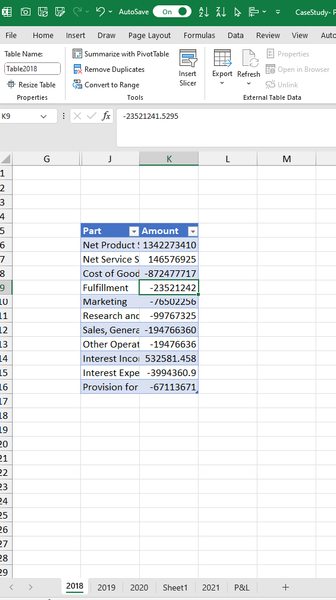
BenjoBenjo Can't be sure without looking at the file itself, but are you sure that the table is called "Table2018"? And are the 'part' descriptions spelled exactly the same and the columns in the table are called Part and Amount exactly?. I.e. no trailing spaces or other invisible characters anywhere?
Attached a simplified mock-up of your example. It should work as explained.
- BenjoBenjoOct 24, 2023Tin Contributor
Riny_van_Eekelen Hi Riny, thanks so much for your help. Using your sample it worked for only th 2018. When i dragged the formula across for 2019 and 2020, it still gives me issue. I noticed that even the table name is "Table2018" I can use just "Table". I was with the notion that i have to use the exact table name "Table2018" which i was wrong and now it makes sense that it wont work when i drag across. However, with your formula it should work for 2019 and 2020 as well. I attached my workings here https://docs.google.com/spreadsheets/d/1zC4KShgURZASj6dFB6XVYe03MPhsP7nv/edit?usp=drive_link&ouid=107977624639648515691&rtpof=true&sd=true
I would really appreciate if you could kindly help me on this.
Thanks
- Riny_van_EekelenOct 24, 2023Platinum Contributor
BenjoBenjo The file link requires a log-in so I can't access it. Attaching another file with three years and the same formula copied across. It works as intended.