Forum Discussion

Colin_Padwick
Aug 07, 2023Copper Contributor
Sumifs return incorrect result
Hi Tech Community I wonder if you can help me? I have a spreadsheet which uses sumifs, but it seems that the results returned are not always correct. I am not sure how to attach the sprea...
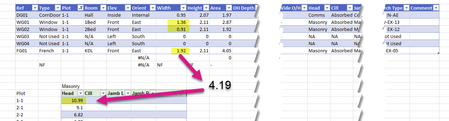
- Aug 07, 2023I'm guessing you didn't enter it as forced text (either '1-1 or into cells pre-formatted as text) and therefore Excel assumed those to be dates and in the case of 1-1 that is Jan 1 (this yr) and in the case of 1-23 it is Jan 2023 (and assumed the 1st) and hence BOTH 1-1 and 1-23 resulted in 2023-01-01 as the date value and hence the same value. but that is just my guess. In the other cases the Month-Day (of this year) and the Month-Year values didn't overlap so there wasn't an issue.

mtarler
Aug 07, 2023Silver Contributor
I'm guessing you didn't enter it as forced text (either '1-1 or into cells pre-formatted as text) and therefore Excel assumed those to be dates and in the case of 1-1 that is Jan 1 (this yr) and in the case of 1-23 it is Jan 2023 (and assumed the 1st) and hence BOTH 1-1 and 1-23 resulted in 2023-01-01 as the date value and hence the same value. but that is just my guess. In the other cases the Month-Day (of this year) and the Month-Year values didn't overlap so there wasn't an issue.

Colin_Padwick
Aug 07, 2023Copper Contributor
The cells were preformatted as text, but not necessarily had the preceeding '.
Your date theory sounds plausible to me.
I have made a mental note not to use numbering scheme that could look like a date to Excel.
Thanks for your help.
- SergeiBaklanAug 14, 2023Diamond Contributor
Excel considers as text any value if the cell is formatted as text and the value preceding with ' if any other format is applied to the cell.
