Forum Discussion

SUMIFS problem with separate summation array
- Nov 04, 2023
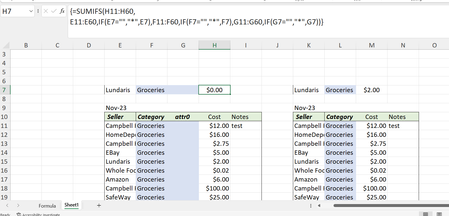
Yakiv If you want to stick with the SUMIFS() function, try using the not equal to operator with "some random text", rather than "*". The asterisk method will only include cells that contain text values of any length, excluding blank cells. The not equal to method will work with any data type (text, numbers and dates), including blank cells. Just be sure to use a random text string that is not present in the criteria range. For example, you could use "<>λ" to include all values in the range that are not equal to the Greek Small Letter Lambda symbol:
=SUMIFS(H11:H60,
   E11:E60, IF(E7="", "<>λ", E7),
   F11:F60, IF(F7="", "<>λ", F7),
   G11:G60, IF(G7="", "<>λ", G7))

Yakiv If you want to stick with the SUMIFS() function, try using the not equal to operator with "some random text", rather than "*". The asterisk method will only include cells that contain text values of any length, excluding blank cells. The not equal to method will work with any data type (text, numbers and dates), including blank cells. Just be sure to use a random text string that is not present in the criteria range. For example, you could use "<>λ" to include all values in the range that are not equal to the Greek Small Letter Lambda symbol:
=SUMIFS(H11:H60,
   E11:E60, IF(E7="", "<>λ", E7),
   F11:F60, IF(F7="", "<>λ", F7),
   G11:G60, IF(G7="", "<>λ", G7))
 YakivNov 05, 2023Tin ContributorI like this solution very much indeed!!! When Mr Hans Vogellar made me aware that the * symbol represents a sequence of characters which will mot match with empty cells and suggested preloading the target cells with a "space" before his SUMPRODUCT suggestion approach (also good). But I really like your approach, it is a great work around and maintains the straight forwardness of the formulation. thank you (and Mr. Vogelaar) for your insights and great suggestions. I really appreciate how both of you took the time and effort to help me through this.