Forum Discussion

SUMIFS problem with separate summation array
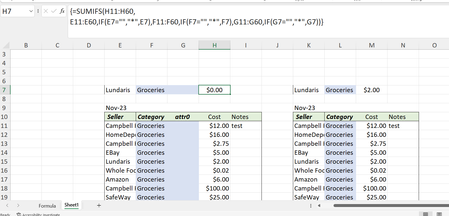
- Nov 04, 2023
Yakiv If you want to stick with the SUMIFS() function, try using the not equal to operator with "some random text", rather than "*". The asterisk method will only include cells that contain text values of any length, excluding blank cells. The not equal to method will work with any data type (text, numbers and dates), including blank cells. Just be sure to use a random text string that is not present in the criteria range. For example, you could use "<>λ" to include all values in the range that are not equal to the Greek Small Letter Lambda symbol:
=SUMIFS(H11:H60,
   E11:E60, IF(E7="", "<>λ", E7),
   F11:F60, IF(F7="", "<>λ", F7),
   G11:G60, IF(G7="", "<>λ", G7))


Hi OliverScheurich
Yes I've noticed that it "tends" to work but if you play with it a bit, for example, add a few extra range:criteria conditions, it will stop working as shown in the first image. I wondered if this be a corrupted excel executable on my local machine. I intend to try it on a different machine in a few hours.