Forum Discussion

A819A1L
Mar 16, 2020Brass Contributor
SUMIFS excluding duplicate values
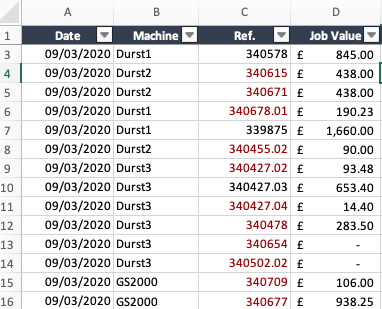
Hello, The goal is to sum the job value (column D) for each machine (column B). The issue is that a value will be included more than once because a job reference is listed more than once (column ...
- Mar 16, 2020
Couple of more variants if only I understood the logic correctly
with
=SORT(UNIQUE(FILTER(B2:B350,B2:B350<>"")))and
=SUM(INDEX($D$2:$D$350,XMATCH($F345&UNIQUE(FILTER($C$2:$C$350,$B$2:$B$350=$F345)),$B$2:$B$350&$C$2:$C$350,0)))Another one is simple Power Query (Sheet2)


datawizard
Jun 09, 2025Copper Contributor
I would create a helper column "count" to count the number of Machines. If the count is more than 1 then it should be 0 (using if function). then multiply your function by that count column. in this case you only sum values that have count of 1. A good article on this is here: https://dataempower.net/excel/sum-of-unique-values-in-a-dataset/