Forum Discussion

SUMIFS excluding duplicate values
- Mar 16, 2020
Couple of more variants if only I understood the logic correctly
with
=SORT(UNIQUE(FILTER(B2:B350,B2:B350<>"")))and
=SUM(INDEX($D$2:$D$350,XMATCH($F345&UNIQUE(FILTER($C$2:$C$350,$B$2:$B$350=$F345)),$B$2:$B$350&$C$2:$C$350,0)))Another one is simple Power Query (Sheet2)


Would you like to only sum the first instance for each given job?

Patrick2788 Hello,
Yes, that would work. But specifically it would need to be the first instance on a machine not in total as the same job can be run on more than one machine, many times on that machine.
Thanks
- Patrick2788Mar 16, 2020Silver Contributor
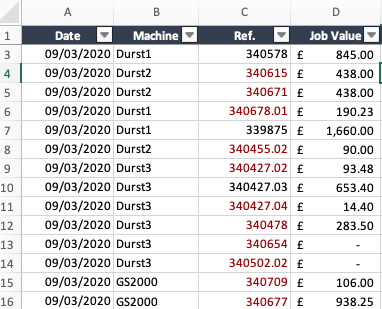
To confirm, this means the value returned for "Durst 1" would be 845?
- A819A1LMar 16, 2020Brass Contributor
Patrick2788 No, it would be £2,695.23. It would sum the value on row 3, 6 and 7.
The screen shot is quite limiting. Attached is a spreadsheet with 350 lines. You can see there that the references are duplicated.
- A819A1LMar 16, 2020Brass Contributor
I have used just tried this formula:
SUMPRODUCT($D$2:$D$345,IF($C$2:$C$345="",0,1/COUNTIF($C$2:$C$345,$C$2:$C$345))*($B$2:$B$345="Durst1"))
Which is returning the value of £14,052.68 for "Durst1", whereas it should be £20,873.55. I think this is because it's including the value of a job only once across all machines rather than individual machines.