Forum Discussion

Sum A Range Based on The Difference Between Text In Another Column
 Aug 09, 2018
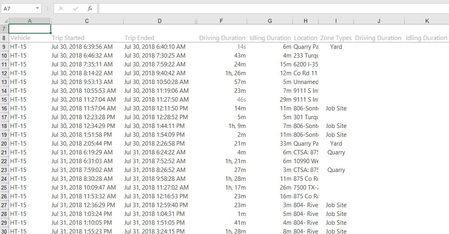
I think I can do this with one extra column to calculate the number of blanks cells above whatever zone you are up to..
Try this. In K9 enter this array formula:
=ROW()-1-MAX(IF(NOT(ISBLANK($I$1:I8)),ROW($I$1:I8)))
you need to enter it with ctrl+shift+enter.
Next in K9 add this formula:
=IF(ISBLANK(I9),"",SUM(OFFSET(F9,0,0,(J9+1)*-1)))
copy both down however far you have data..
That should sum everything in column F between the previous Zone and this one..
I think I can do this with one extra column to calculate the number of blanks cells above whatever zone you are up to..
Try this. In K9 enter this array formula:
=ROW()-1-MAX(IF(NOT(ISBLANK($I$1:I8)),ROW($I$1:I8)))
you need to enter it with ctrl+shift+enter.
Next in K9 add this formula:
=IF(ISBLANK(I9),"",SUM(OFFSET(F9,0,0,(J9+1)*-1)))
copy both down however far you have data..
That should sum everything in column F between the previous Zone and this one..

Disregard, both formulas work perfectly once setup how I suggested in my first reply.
My issue was that what I thought were blanks in column I were actually reference formulas that auto-populated when the report was downloaded off of the software. Therefore the array formula wasn't working as it should. I just came up with a way to get those removed so I am up and running.
Thank you for the help,
-Barrett
- Philip WestAug 09, 2018Steel Contributor
Super!
Glad it worked. It was quite a fun puzzle.