Forum Discussion

Sum A Range Based on The Difference Between Text In Another Column
 Aug 09, 2018
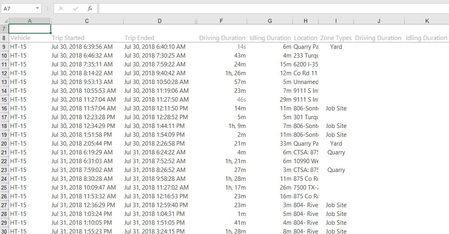
I think I can do this with one extra column to calculate the number of blanks cells above whatever zone you are up to..
Try this. In K9 enter this array formula:
=ROW()-1-MAX(IF(NOT(ISBLANK($I$1:I8)),ROW($I$1:I8)))
you need to enter it with ctrl+shift+enter.
Next in K9 add this formula:
=IF(ISBLANK(I9),"",SUM(OFFSET(F9,0,0,(J9+1)*-1)))
copy both down however far you have data..
That should sum everything in column F between the previous Zone and this one..
I think I can do this with one extra column to calculate the number of blanks cells above whatever zone you are up to..
Try this. In K9 enter this array formula:
=ROW()-1-MAX(IF(NOT(ISBLANK($I$1:I8)),ROW($I$1:I8)))
you need to enter it with ctrl+shift+enter.
Next in K9 add this formula:
=IF(ISBLANK(I9),"",SUM(OFFSET(F9,0,0,(J9+1)*-1)))
copy both down however far you have data..
That should sum everything in column F between the previous Zone and this one..

Thanks for your reply Phillip,
I am unfamiliar with the offset formula so I appreciate the idea.
Not sure I'm quite clear on the execution of what you suggested, however, I understand the logic.
Any chance you could look back through what you wrote and check how it applies to what I have pictured above? Tried getting both formulas into K9 just to be sure, but I'm pretty sure that was just a typo.
I believe I would need to insert an additional column, logically creating a new column "J" for the array function to work in, and shifting my previous columns "J" and "K" to "K" and "L." From here your second formula would be used in both column K to reference the Driving Duration in column E and in column L to reference Idling Duration in column F.
If that sounds about right, I'd really appreciate it if you would just update what you had. Excited to be on the path to a relatively easy solution.