Forum Discussion

NoraJJ
Mar 01, 2021Copper Contributor
Subtract days in the past, from today, to show a past due message.
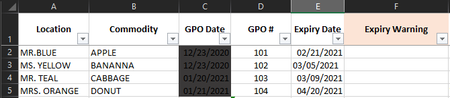
The expiry warning is todays date against the date in column E. I need a message to populate in column F with one of the three options. "Past due" "Due in less than 10 days" "More than 1...
- Mar 01, 2021
In F2:
=IF(E2="","",IF(E2<TODAY(),"Past due",IF(E2<TODAY()+10,"Due in less than 10 days","Due in 10 days or more")))
Fill down.

HansVogelaar
Mar 01, 2021MVP
In F2:
=IF(E2="","",IF(E2<TODAY(),"Past due",IF(E2<TODAY()+10,"Due in less than 10 days","Due in 10 days or more")))
Fill down.
- NoraJJMar 01, 2021Copper ContributorHans, you are so smart with excel functions, I am learning good things from the formula help. Thanks for taking your time to help me with something I was not able to discover on my own.
