Forum Discussion

Structured Reference
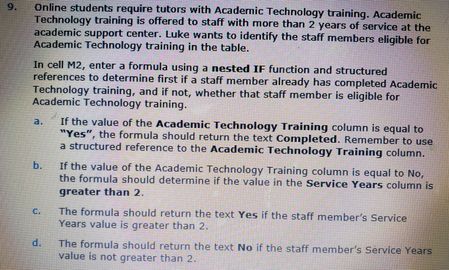

mathetes I hope all this information helps. There were three cell formulas that gave us trouble that we finally got help on the community to figure out how to get them to say the right information, well except for M2. My professor and I are still having issues figuring out why it is still saying mine is wrong but when she types it in on my document then it is right. So I am including pictures of the instructions for M2 and I am including pictures of the formulas of the other two cells that gave us trouble. I also included a picture of what I have in M2 as well. Hopefully this helps.


In Windows there are many ways to make screenshot (e.g. Win+Shift+S) except mobile phone.
And I believe your professor could answer on your questions.
- tommygirl_73703Sep 21, 2020Copper Contributor
SergeiBaklan Thank you for telling me how to do a screenshot on the computer. I did not know how to do that. I have never posted on here before and I am trying to do it the best I can. I do not know what information if needed to get help because I do not know what I did wrong.
- SergeiBaklanSep 21, 2020Diamond Contributor
Screenshots: - you may pin to taskbar Snip & Scatch or/and Snipping Tool, but work. Or use shortcuts to use them.
Excel difference: - template is made for Excel 2016 which doesn't support Dynamic Arrays, and you are on Excel 365 which is more modern one and has Dynamic Arrays by default. Most probably the difference was since in some of formulas implicit intersection operator @ was missed. In some cases that could give different results (if no error appeared).