Forum Discussion

packie
Jul 28, 2024Brass Contributor
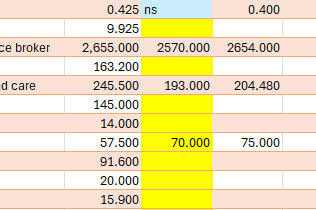
Strange conditional formatting results being returned
It's puzzling why blank cells are being formatted also... Using.... Format only cells that contain Cell value / greater than / =I5 Fill colour = yellow There should only be one c...
- Jul 28, 2024
Thanks. The cause of the problem is that the empty-looking cells in column J are not really blank. This sometimes occurs with data imported from outside Excel.
You can correct this as follows:
Select column J.
On the Data tab of the ribbon, click Text to Columns, then immediately click Finish.
The empty-looking cells should now be blank.


packie
Jul 28, 2024Brass Contributor
If you don't see the image I uploaded please let me know.