Forum Discussion

DVMUK
Feb 03, 2025Copper Contributor
Stay calculator
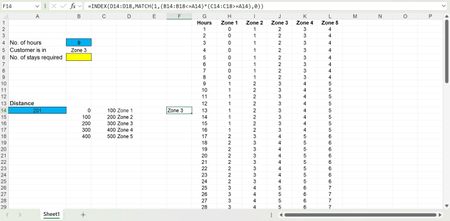
Hi I am trying to make a calculator that works out the number of stay over nights required for an engineer. In the below screen shot of the spread sheet I have a 2 blue squares for data entry and t...
- Feb 04, 2025
For B6 cell you may use-
=INDEX(H2:L1000,MATCH(B4,G2:G1000,0),MATCH(B5,H1:L1,0))


DVMUK
Feb 04, 2025Copper Contributor
Hi m_tarler
Thank you for the help unfortunately the formula that you supplied just reports and error saying I have specified too many arguments.

m_tarler
Feb 04, 2025Bronze Contributor
sorry about that not sure how that extra term got in there. I believe I corrected it above.
basically it is just using INDEX for the row based on B4 and the column based on the Match function you already were using as part of the formula in cell F14.