Forum Discussion

split or create a funtion


- HansVogelaarJul 31, 2024MVP
Hi Niko, your formula probably depends on your system date settings. It returns #VALUE! on my computer too.
- m_tarlerJul 31, 2024Silver ContributorNikolinoDE that is a clever way to do it. Maybe use the ISO standard for the date format then it may be more universal (year-month-day):
=(B2&-1&-1)+A2*7-MOD(B2&-2&-1,7)-4
HansVogelaar and SergeiBaklan can you confirm if this version works for you too?- SergeiBaklanJul 31, 2024Diamond Contributor
Yes, ISO always works
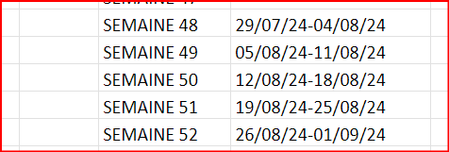
Another comment, that doesn't answer on initial question. Based on screenshot week numbers are not for calendar year (for financial year ?) . In this year week #52 is the last week in August, week #53 is first week in Sep. I'm not sure how first week starts - with any day in the first month, or with only any work day in the first month, or something else.
- NikolinoDEJul 31, 2024Platinum Contributor
That's right, now I've checked and the German formula =(1&-B3)+A3*7-REST(2&-1&-B3;7)-4 cannot be automatically translated into English by Excel, it doesn't accept.
The formula may be trying to perform arithmetic on concatenated strings, which could be problematic when (not sure, but could be most likely). Here is a revised approach in English, it should actually work, even i dont test it =VALUE(1 & -B2) + A2 * 7 - MOD(VALUE(2 & -1 & -B2), 7) - 4Thanks both of you for the tip


