Forum Discussion

Lulu4466660
Nov 06, 2019Copper Contributor
Specifically select column 3 to 156 and line 2 to 179 automatically from a database
I want specifically select column 3 to 156 and line 4 to 179 automatically from a database.
How to do it?
7 Replies
- Hello,
Bases on your question, there is need to use Macro. Kindly follow the steps below
1. In your Sheet, execute ALT + 11 to open Visual Basic for Applications editor
2. In the Insert drop down, select Module
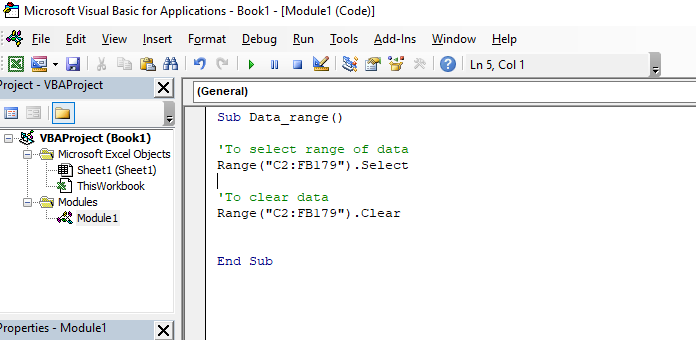
3. In the code window, execute the single line of code as follows
Sub Data_range ()
Range("C2:FB179").Select
End Sub
4. Execute F5 to run the code.
The data range will be selected on your spreadsheet. (See the attached picture)
Regards - mathetesGold ContributorAs you will have noticed, you get several quite distinctive answers in just a few minutes. I'm curious (not about any confidential business purposes) about what lies behind this request. One or more of the answers you've gotten, thought they all would work on one level, might not actually be what you need for your underlying goal. We each, I suspect, were answering based on our own past experiences with trying to do something very similar....but you may be doing something altogether different from any of us.
 Patrick2788Silver Contributor
1. Define the range
2. Use the name box drop down to go to the defined range OR Press F5 to open Go to | Special to go to it.
- mathetesGold ContributorUsing the top left corner of the area you want to select as your reference point, go to Insert....Name....Define, give the area a name of your own choosing, and then enter the formula =OFFSET($C$2,0,0,178,153)
That's a way to do it. Unless you meant by your column numbers the 156th column from that start point, in which case you'd use 156; I was presuming starting in column 3 and going to 159)...but that's the idea. If you want to make your specific selection one that can be dynamic, put the two numbers themselves into cells outside of your database and refer to those cells in your OFFSET formula. Lulu4466660Copper ContributorThank you for answer! I will answer you i i success!
You can create a little macro to do this (assumes your data starts in cell A1):
Sub SelectMyRange()

Range("C2:EZ179").Select

End Sub
You can throw this macro into your Personal Macro workbook and run it on demand whenever you'd like.
- Lulu4466660Copper ContributorThank you for your answer. I will test it!