Forum Discussion

sort by column then by numbers in a row
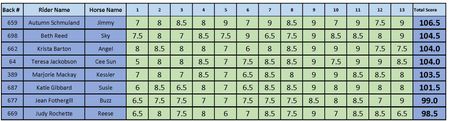

Hi pevenden,
Does this formula help you? I have applied it to cell S1 (see screenshot). Try it and let me know.
=LET(
data, A1:Q9,
  dr, DROP(data, 1),
      VSTACK(TAKE(data, 1), CHOOSECOLS(SORT(HSTACK(dr, --TEXTSPLIT(TEXTJOIN(";",,
        BYROW(CHOOSECOLS(dr, SEQUENCE(, 13, 4)),
              LAMBDA(b, ARRAYTOTEXT(BYCOL(SEQUENCE(, 9, 9, -0.5),
              LAMBDA(a, SUM(--(b = a)))))))), ", ", ";")), SEQUENCE(, 10, 17),
             -SIGN(SEQUENCE(, 10))), SEQUENCE(, 17)))
)
HTH
IlirU
- m_tarlerJun 01, 2026Silver Contributor
alternatively you could just add a 'RANK' column and then use built in sorting to rearrange the current table instead of creating a separate table. Here is a relatively generic option (i.e. doesn't assume 9 is the max or the number of columns) to create that 'RANK' column:
=LET(in,A1:.G99,
max_count, COLUMNS(in),
rcount, SEQUENCE(ROWS(in)),
uniq_vals, SORT(UNIQUE(TOCOL(in)),,-1),
rankrow, BYROW(in,LAMBDA(r, CONCAT(TEXT(MMULT(--(r=uniq_vals),EXPAND(1,max_count,,1)),"00")))),
SORTBY(rcount,SORTBY(rcount,BYROW(in,SUM),-1,rankrow,-1)))
where you just need to change the A1:.G99 to the corresponding range of values.
I currently 'ranks' them with 1 being the highest but replace both of the '-1' in the last line with '1' and you can have it 'rank' with 1 being the lowest and the highest having the biggest value.
 pevendenJun 02, 2026Brass Contributor
I've put your formula into one line in the formula bar, in cell W6 as follows:
=LET(in,B6:T52,max_count, COLUMNS(in),rcount, SEQUENCE(ROWS(in)),uniq_vals, SORT(UNIQUE(TOCOL(in)),,-1),rankrow, BYROW(in,LAMBDA(r, CONCAT(TEXT(MMULT(--(r=uniq_vals),EXPAND(1,max_count,,1)),"00")))),SORTBY(rcount,SORTBY(rcount,BYROW(in,SUM),-1,rankrow,1)))
Direct copy from above, but I get a #NAME? error.
I have adjusted the cell references for my table. I want to rank from highest to lowest.
when working with the table, I filter and remove the blanks.
- djclementsJun 03, 2026Silver Contributor
A #NAME? error, in this case, might indicate you don't have access to eta-Lambda reduction, e.g. BYROW(array,SUM) vs BYROW(array,LAMBDA(x,SUM(x))).
Having said that, I don't believe this method will help in the end anyways, as attempting to sort a dataset with a dynamic spilled array present will error with "You can't change part of an array."
To create a "Rank" helper column with which to sort by, you'll need to use a separate formula in each cell (non-spillable). Try the following:
On the Ribbon, go to Formulas > Define Name
- Name: RiderRank
- Refers to:
=LAMBDA(rider_ID,riders,results,[totals],IF(rider_ID="","",XMATCH(rider_ID,TAKE(SORT(HSTACK(riders,IF(ISOMITTED(totals),BYROW(results,LAMBDA(x,SUM(x))),totals),WRAPROWS(SORTBY(TOCOL(results),TOCOL(IFNA(SEQUENCE(ROWS(results)),results)),1,TOCOL(results),-1),COLUMNS(results))),SEQUENCE(,1+COLUMNS(results),2),-1),,1))))Then, in cell X6, input the following formula and copy/drag it down to cell X52:
=RiderRank(B6,$B$6:$B$52,$E$6:$S$52,$T$6:$T$52)You should then be able to sort the data by column X ("Rank").

