Forum Discussion

QuestionJ
Jan 27, 2024Copper Contributor
Some help to find the right formula - advancing dates
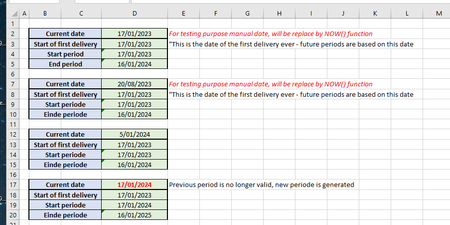
I want to make a file with an advancing timeframe (period). Macros are not allowed at work, so i have to try it with formulas. The first table is the one i want to keep - the 2nd to 4th how the c...

SnowMan55
Jan 27, 2024Bronze Contributor
It seems that you have multiple challenges here. But I may have an incorrect understanding, so are the following all true?
- You want to copy a blue-and-green block of eight cells to the bottom of the data when some real-world event is to be recorded.
- You want the "Current date" formula to contain the date (and also time, if you are planning to use the NOW function) when the copy is made. And you want that value, once calculated, to be unchanged from that time forward. FormulaCD
- You want the "Start of first delivery" row to contain the same date as the original (copy-from) row.
- You want the "Start periode" formula to calculate either: 1) the same date as the prior "Start periode" row, if the "Current date" value is not a later date than the "Einde periode" value in the prior block of data; otherwise, 2) one year later than that prior-block date. FormulaSP
- You want the "End periode" formula to calculate a date that is one year later than the just-calculated "Start periode" date, minus one day. FormulaEP
If your worksheet is structured with a fixed number of rows between blocks (1 empty row => 5 rows per block), then you can use a FormulaSP like this one for cell D9:
=IF( FLOOR.MATH(D7) <= D5, D4, D5+1 )(Spaces are included for readability only. My delimiter between parameters is a comma; yours is a semicolon.)
FormulaCD will involve iterative calculation. Your FormulaEP (cell D5) appears to be valid.
Experiment with Sheet2 in the attached workbook.