Forum Discussion

SOLVED - Split data in dynamic/spill array by delimiter
- Feb 18, 2023
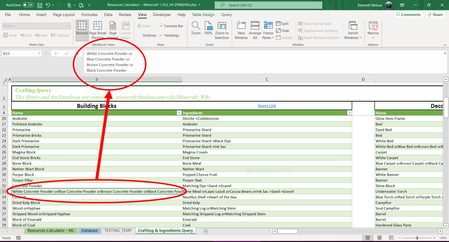
Perhaps you mean something like
=TEXTSPLIT( SUBSTITUTE( TEXTJOIN("@",1, B4# ), CHAR(160)&"or", "@" ), , "@" )


Thanks for the reply! XML is foreign to me so I have no idea how that formula works but it is surely a cleaner approach. Two things now to figure out and I can make it perfect.
1) May you make that spill?
2) Can you move everything else down from the split?
It doesn't matter what order they're in but I was thinking of maybe having a spill range of everything that doesn't have a delimiter and a spill range of everything that does (then I'll use =LET() to combine them later)?

- KendetharJan 28, 2023Iron ContributorAs of updating my Office today, I now have the =TEXTSPLIT() function. How is it possible with this function?
- Harun24HRJan 28, 2023Silver Contributor
Kendethar The formula will be-
=TEXTSPLIT(B4,CHAR(160) & "or")- KendetharFeb 02, 2023Iron Contributor
That's a new and better version of the =FILTERXML() method from before but still can't get it to insert into the middle of the spill array - my second issue.
I feel like I'm kind of on the right track with:
=TEXTSPLIT(T(INDIRECT("B"&SEQUENCE(197,1,1,1)+3)),,CHAR(160)&"or")However, this formula will just give me the first text and discard the rest. Probably because it cannot spill twice, vertically and horizontally.
Filling this formula down to row 200 will tell me how many rows the initial listing will need to take up but I don't know how to make it useful:
=IFERROR(ROWS(TEXTSPLIT($B4,,CHAR(160)&"or")),"")I messed around on the attached sheet with formulas but not having luck.
- KendetharAug 19, 2022Iron Contributor
I can see on https://techcommunity.microsoft.com/t5/excel-blog/announcing-new-text-and-array-functions/ba-p/3186066 that only a couple of days ago (17Aug22) they released it to the Beta Channel so it should be available soon. In other words and in the meantime, I suppose I'm trying to determine the approach/principle for how to achieve my goal.
- SergeiBaklanAug 19, 2022Diamond Contributor
I believe text functions are available for Current (Preview) and partially for Current channels.
- Patrick2788Aug 19, 2022Silver ContributorThanks for the heads up. I checked two work computers on Current channel and 1 has the functions.
