Forum Discussion

SOLVED - Split data in dynamic/spill array by delimiter
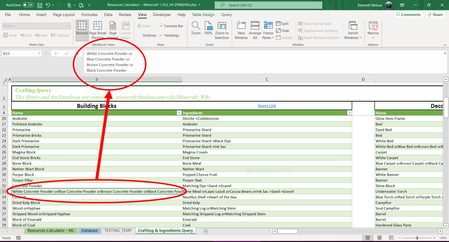
- Feb 18, 2023
Perhaps you mean something like
=TEXTSPLIT( SUBSTITUTE( TEXTJOIN("@",1, B4# ), CHAR(160)&"or", "@" ), , "@" )


Kendethar FILTERXML may help you. Try-
=TRANSPOSE(FILTERXML("<t><s>"&SUBSTITUTE(B4,CHAR(160) & "or","</s><s>")&"</s></t>","//s"))
See the attached file.

Thanks for the reply! XML is foreign to me so I have no idea how that formula works but it is surely a cleaner approach. Two things now to figure out and I can make it perfect.
1) May you make that spill?
2) Can you move everything else down from the split?
It doesn't matter what order they're in but I was thinking of maybe having a spill range of everything that doesn't have a delimiter and a spill range of everything that does (then I'll use =LET() to combine them later)?
- Harun24HRAug 19, 2022Silver ContributorThat is possible if you have access to TEXTSPLIT() function. TEXTSPLIT() is only available to office insiders (BETA CHANNEL).
- KendetharJan 28, 2023Iron ContributorAs of updating my Office today, I now have the =TEXTSPLIT() function. How is it possible with this function?
- KendetharAug 19, 2022Iron Contributor
I can see on https://techcommunity.microsoft.com/t5/excel-blog/announcing-new-text-and-array-functions/ba-p/3186066 that only a couple of days ago (17Aug22) they released it to the Beta Channel so it should be available soon. In other words and in the meantime, I suppose I'm trying to determine the approach/principle for how to achieve my goal.
- SergeiBaklanAug 19, 2022Diamond Contributor
I believe text functions are available for Current (Preview) and partially for Current channels.