Forum Discussion

SOLVED - Dynamic/spill array formula to show result finite amount of times based on criteria
- May 10, 2022
Update:
I figured it out.
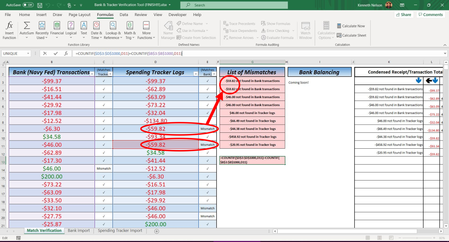
The idea I had was: everything below/above (below in my case) each cell will see if "Mismatch" with the existing value next to it already exists. So, the first thing I had to do was count the occurrences of the value under Bank and under Tracker then subtract for the difference. Then, the difference was how many times "Mismatch" would appear for the value, in the array. Finally, for it to be a dynamic array (spill), I used the SEQUENCE function to increment 1 to the start of the range reference in the COUNTIF function used to check all below.
It's not 100% accurate as far as which one(s) weren't logged right (being the order) but in my case, I'm not concerned with the dates as long as they're all from the 1st of the month to the current date - is the match of each value that matters.
Formula (column G):
=IFERROR(IF($E$3:$E$1000="","",IF(COUNTIF($B$3:$B$1000,$E$3:$E$1000)=COUNTIF($E$3:$E$1000,$E$3:$E$1000),"✓",IF(COUNTIF(INDIRECT("E"&3+SEQUENCE(998,1,,1)&":$E$1001"),$E$3:$E$1000)<COUNTIF($E$3:$E$1000,$E$3:$E$1000)-COUNTIF($B$3:$B$1000,$E$3:$E$1000),"Mismatch","✓"))),"")Formula (for Flash Fill):
=IF(D3="","",IF(COUNTIF($B$3:$B$1000,D3)=COUNTIF($D$3:$D$1000,D3),"✓",IF(COUNTIF(D4:$D$1001,D3)<COUNTIF($D$3:$D$1000,D3)-COUNTIF($B$3:$B$1000,D3),"Mismatch","✓")))Note:
The "ref_text" in the INDIRECT function is entered as a string thus does not automatically account for column/row reference updates and will need to be updated manually.
Attached is a sample .xlsx workbook I made so y'all can update the formula to your needs. Feel free to share your tweaks or suggestions for better ways to accomplish this.

Update:
I figured it out.
The idea I had was: everything below/above (below in my case) each cell will see if "Mismatch" with the existing value next to it already exists. So, the first thing I had to do was count the occurrences of the value under Bank and under Tracker then subtract for the difference. Then, the difference was how many times "Mismatch" would appear for the value, in the array. Finally, for it to be a dynamic array (spill), I used the SEQUENCE function to increment 1 to the start of the range reference in the COUNTIF function used to check all below.
It's not 100% accurate as far as which one(s) weren't logged right (being the order) but in my case, I'm not concerned with the dates as long as they're all from the 1st of the month to the current date - is the match of each value that matters.
Formula (column G):
=IFERROR(IF($E$3:$E$1000="","",IF(COUNTIF($B$3:$B$1000,$E$3:$E$1000)=COUNTIF($E$3:$E$1000,$E$3:$E$1000),"✓",IF(COUNTIF(INDIRECT("E"&3+SEQUENCE(998,1,,1)&":$E$1001"),$E$3:$E$1000)<COUNTIF($E$3:$E$1000,$E$3:$E$1000)-COUNTIF($B$3:$B$1000,$E$3:$E$1000),"Mismatch","✓"))),"")Formula (for Flash Fill):
=IF(D3="","",IF(COUNTIF($B$3:$B$1000,D3)=COUNTIF($D$3:$D$1000,D3),"✓",IF(COUNTIF(D4:$D$1001,D3)<COUNTIF($D$3:$D$1000,D3)-COUNTIF($B$3:$B$1000,D3),"Mismatch","✓")))Note:
The "ref_text" in the INDIRECT function is entered as a string thus does not automatically account for column/row reference updates and will need to be updated manually.
Attached is a sample .xlsx workbook I made so y'all can update the formula to your needs. Feel free to share your tweaks or suggestions for better ways to accomplish this.