Forum Discussion

Sinlge ddown - full row movement - seperate sheets
- Feb 03, 2025
The Dropbox link didn't work for me, but I think I am following what you want to do. I think you want to be able to pick an item in a drop-down list on Sheet2 and have it show all the rows from Sheeet1 that match the selection in the drop-down.
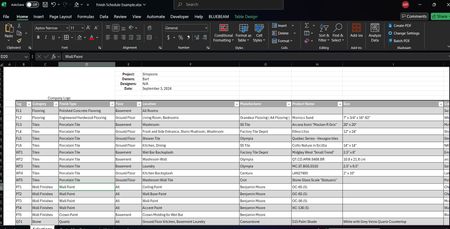
I think the FILTER function is the easiest way for you to do that, as in this example. In this case, I have everything on one sheet. If you pick Tiles from the drop-down in G1, it will show all the rows from the table that have Tiles in the Category column. If you need to sort, you can put a SORT function around the FILTER function, such as =SORT(FILTER(Table1,Table1[Category]=G1),3) if you wanted to sort by the Floor column (3).
I hope that helps. If I'm misunderstanding what you're trying to do, please clarify.

The Dropbox link didn't work for me, but I think I am following what you want to do. I think you want to be able to pick an item in a drop-down list on Sheet2 and have it show all the rows from Sheeet1 that match the selection in the drop-down.
I think the FILTER function is the easiest way for you to do that, as in this example. In this case, I have everything on one sheet. If you pick Tiles from the drop-down in G1, it will show all the rows from the table that have Tiles in the Category column. If you need to sort, you can put a SORT function around the FILTER function, such as =SORT(FILTER(Table1,Table1[Category]=G1),3) if you wanted to sort by the Floor column (3).
I hope that helps. If I'm misunderstanding what you're trying to do, please clarify.

Steve - You're the FN man!
Thats exactly what I was looking for.
Where should I be applying that Function?
Would that be in the first empty spot on the drop down list sheet where I want to see the items from the previous sheet?
- Feb 05, 2025
Glad that helped. Yes. The formula with the FILTER function should be at the top-left of where you want to see the data. It will spill the results to the right and down.