Forum Discussion

LFM123
Feb 26, 2024Copper Contributor
Simple persentile formula not working
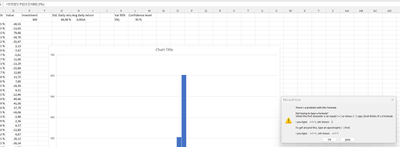
Why is the formula not working?

smylbugti222gmailcom
Feb 27, 2024Iron Contributor
The error message you're encountering in the formula =PERCENTILE.INC(D3:D31,1-L2) is likely due to a combination of two factors:
Incorrect Argument for PERCENTILE.INC:
- The PERCENTILE.INC function requires the second argument (k) to be a value between 0 (exclusive) and 1 (inclusive).
- In your formula, 1-L2 might result in a value outside this range, causing the error.
Data Array Size and k Value:
- The PERCENTILE.INC function calculates the k-th percentile of a data set.
- If you have a small number of data points (e.g., less than 100) and a specific k value close to the edges (0 or 1), the function might not be able to find a valid percentile within the data set, leading to an error.
Here are two ways to fix the formula:
1. Adjust the k Value:
- Instead of dynamically calculating k using 1-L2, try entering a fixed value between 0 and 1.
- For example, to calculate the 75th percentile, you can use =PERCENTILE.INC(D3:D31,0.75).
2. Use PERCENTILE Function (if applicable):
- If you need more flexibility in calculating percentiles based on dynamic criteria, consider using the PERCENTILE function instead.
- The PERCENTILE function takes two arguments: the data array and the percentile rank (between 0 and 100).
- For example, to calculate the 75th percentile, you can use =PERCENTILE(D3:D31,75/100).
Additional Notes:
- Ensure you have the correct range of data specified in the formula (D3:D31 in your example).
- Double-check for typos or errors in the formula syntax.
- Consider using the COUNTBLANK function to check for empty cells within your data range, as the PERCENTILE.INC function might treat them as zeros and affect the calculation.
By addressing these potential issues and adjusting the formula accordingly, you should be able to calculate percentiles accurately in your Excel sheet.