Forum Discussion

sallydorman
Jan 06, 2020Copper Contributor
simple math formular (don't understand)
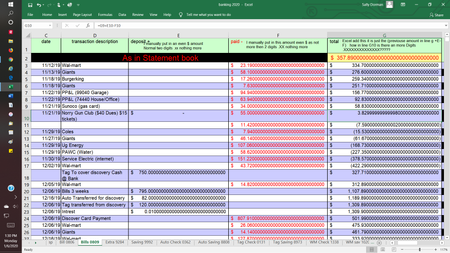
Simple math is off and I don't understand why... Please help.... Sorry going to be long to explain (please stay with me I really need help)... I don't see how it getting a .00000009998 when I am a...
- Jan 06, 2020
It looks like floating point error Floating-point arithmetic may give inaccurate results in Excel accumulated in column G.
I'd use
=ROUND(G2+E2-F3,2)and drag it down.

sallydorman
Jan 06, 2020Copper Contributor
SergeiBaklan Thank you, for your time... I appreciate you for taking you time to help. that looks to be it...
Is there an update to correct this... How can I tell what version I am using....
And Is there a easy way to add the rounding to all?
Looks like I got to do it with 3 different collums
hank you again..

SergeiBaklan
Jan 06, 2020Diamond Contributor
You may put such formula into the cell G3 and drag it down till end of the table. Play with this on the copy of your file.