Forum Discussion

Joha842
Apr 16, 2025Copper Contributor
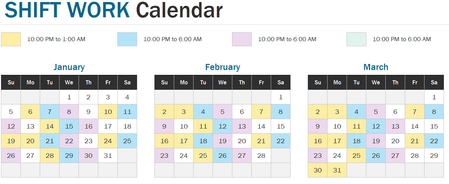
Shift Work Calendar Year at Glance Template
I would like to use the Shift Work Calendar year at glance Template in Excel, but it is only built for 3 jobs. I need to edit for 7 or more jobs, but can't figure out how to do it. I'm sure it's a si...

SergeiBaklan
Apr 17, 2025Diamond Contributor
To add more shifts in Shift Pattern insert new rows for them and add shifts with their unique codes
Next modify Shift Pattern string, i.e. in above: 3 days shift D, one day-off, 2 days shift N, two days off, two days shift S, etc.
Next in Name Manager add names for these shift codes, here are Shift4_Code and Shift5_Code
Next in calendar Conditional Formatting duplicate rule for day formatting
edit formula and change name of the code at the end of formula. Fill with proper color. Result as in attached.