Forum Discussion

Selecting Data Based on Multiple Criteria
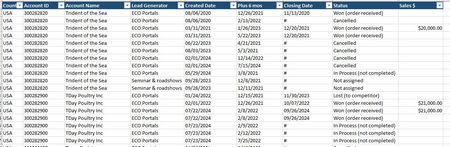

You will have to make it fit your table but I kinda went by what you had. I had an issue with the dates, kept getting strange errors, so I used "less than 180" days in place of "6 months". That made it function correctly. You will have to replace the "#" in your spreadsheet with nothing. Works with blank cell but if there something besides a date in the "Date Closed" column it blows up.
First formula is just a total filter of the table. Lots of extraneous info in the straight filter.
Second formula gets rid of extraneous info but still just a filter. Bracketed numbers will pull out only the columns you want from the array.
Third formula formula totals by account and lead and status. If you have the same Account Name under different Account #'s it will spill and total for each Account #. First time I've ever worked with the =Pivotby and =Take functions. Don't ask me how they work...Google is my friend.
I used =Unique() to get all unique accounts, leads and status entries. Placed the results in pulldowns to reference with the formulas. Allows quickly filtering everything through all the variables. Thank you for this question, I learned a lot while trying to figure it out. Hope one of these is what you were looking for.
Copy and paste Formulas: (you shouldn't have to try and type from the picture above)
=FILTER(B2:I7,(D2:D7=B17)*(C2:C7=B19)*(H2:H7=B18)*(G2:G7-E2:E7<=180),"No Matching Data")
=FILTER(INDEX(B2:I7,SEQUENCE(ROWS(B2:I7)),{1,2,3,7,8}),(C2:C7=B19)*(D2:D7=B17)*(H2:H7=B18),"No Matching Data")
=iferror(LET(h,FILTER(B2:I7,(D2:D7=B17)*(H2:H7=B18)*(C2:C7=B19)*(G2:G7-E2:E7<=180)),PIVOTBY(TAKE(h,,3),,TAKE(h,,-1),SUM,,0)),"No Matching Data")

Thank you for working through this for me. I plugged in the original formula you sent me, and I got a #NAME? error. I'm sure it is something on my end, and I think the screen shot you attached will help me. I'm going to keep working it. I haven't had time to open a personal Google Drive account to try to upload a file. I'm sure that would help everybody who has responded. As mentioned, I'll keep working on it and post again when I get closer. Thank you!
- pefirdNov 21, 2024Copper Contributor
=iferror(LET(h,FILTER(A2:R27940,(E2:E27940="Eco Portals")*(I2:I27940="won")*(D2:D27940="Trident of the Sea")*(H2:H27940-F2:F27940<=180)),PIVOTBY(TAKE(h,,3),,TAKE(h,,-1),SUM,,0)),"No Matching Data")
I made some assumptions, but try this.
- pefirdNov 21, 2024Copper Contributor
It may be trying to reference those pulldowns on my spreadsheet. Place a ' at the front of the formula to turn it into text. Then you can edit manually. When you think you have it right, delete the ' and see if it works.