Forum Discussion

Selecting Data Based on Multiple Criteria
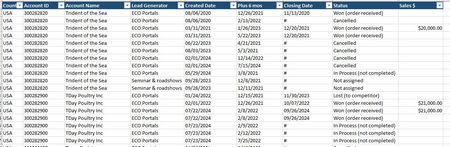

I think you'd find the FILTER function able to accomplish this. Here's a link to a very good explanation of FILTER. And here's a video produced by Microsoft when the function was first introduced.
If you want further help in writing the formula, please provide an actual file--maybe just the top 150 rows of your 32K rows--so we could work with the real thing without having to re-create it. If you can't post it here using drag and drop, then post it on OneDrive or GoogleDrive with a link pasted here that grants access.

I don't seem to be able to share my file. I think my company has a firewall preventing the upload, I was able use the filter formula =FILTER(A2:R27940,(E2:E27940=T2)*(F2:F27940=T3),"") to set up a list by lead generator, but I don't know how to deal with the fact that the same account is on multiple lines.
I'll keep working on it, and in the meantime, I will keep going through the list manually :(
Thank you!
- SergeiBaklanNov 20, 2024Diamond Contributor
It's not in sync with you initial question, FILTER doesn't provide any aggregation. You may use PivotTable, desirably with using data model if it is supported. Or, perhaps and if available, GroupBy/PIVOTBY functions.
Without the file it's hard to be more concrete. Company most probably prohibits to share the file with everyone, but you may use personal free OneDrive or Google Drive and share on it, removing all sensitive information from the file.
- mathetesNov 20, 2024Gold Contributor
FILTER alone doesn't do aggregation. But--and this all depends on the original poster's goal--FILTER can be nested in SUM or AVERAGE or other aggregating functions.
=SUM(FILTER(the column to be summed, criteria))
Criteria can be three or more.
Again, though, as all have been saying, it would be hard to offer more concrete suggestions without access to the actual file or a mockup of it.
