Forum Discussion

Scatter plot with Conditional formatting
- Mar 25, 2024
See the attached demo workbook.

See the attached demo workbook.

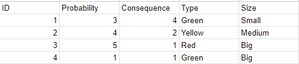
My Bubbles on the x axis follows the ID instead of the probability. (see screenshot below)
- HansVogelaarMar 25, 2024MVP
See thge attached version.
Click on the chart, then click Select Data on the Chart Design tab of the ribbon.
Select the series, then click Edit to see how the x-values, y-values and bubble size are defined.
- MadsBVMar 25, 2024Copper Contributor
I can see that we have Selected Data the same way. But I still get it wrong, when i download the file you've attached I can't spot the difference.
When i try to do it I can only do one of the things at a time.
So i can either plot it with the correct X/Y, or I can get the colors right.
I've posted the screenshot in the post along with an Excel sheet with my data, if you want to look at what I'm doing wrong 🙂- HansVogelaarMar 25, 2024MVP
My demo has only a single series. It has a single color initially The colors are applied by running the macro (click the button).