Forum Discussion

Same condition for a set number of columns
I have a set of columns that have exactly the same condition but each one is independent to the other , which means whenever i want to change a parameter in a column i will have to make the change throughout all the columns
I want when i change a parameter it's applied to all columns
6 Replies
- Martin_WeissBronze Contributor
Hi HassanBosha
generally spoken, you would put your parameter in a dedicated cell (or cell range of you have more parameters) and then refer to that cell/range from all your columns.
But if you can upload an example file, we could give a more precise advise.
 HassanBoshaCopper Contributor
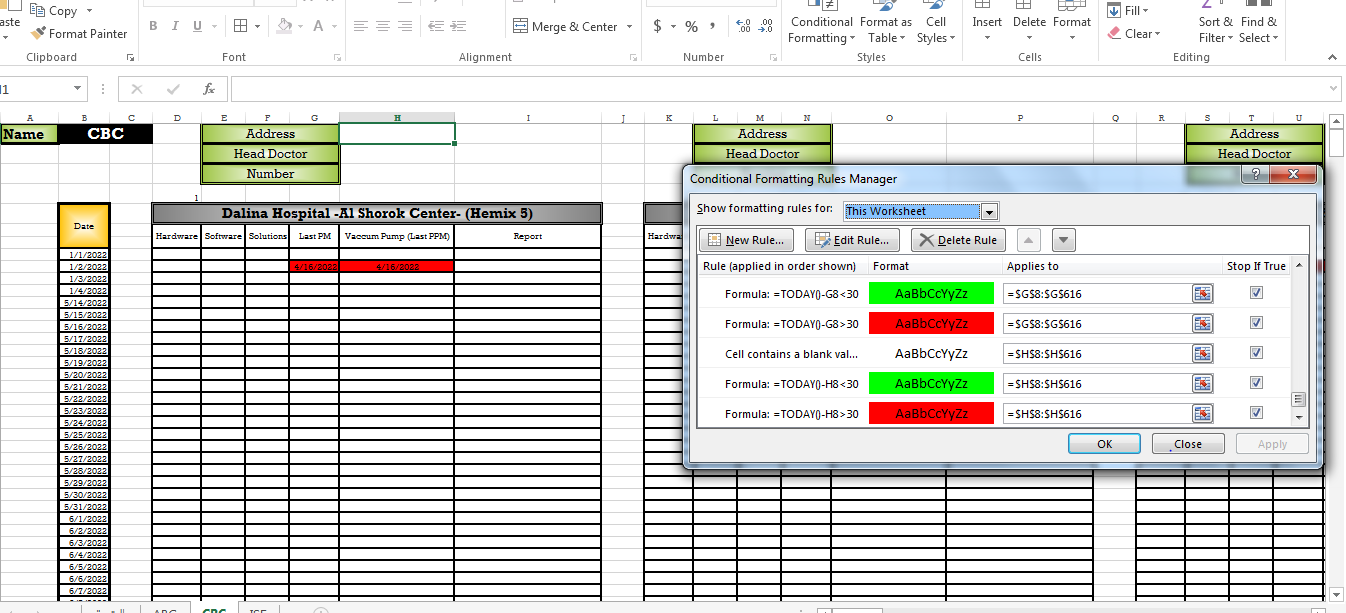
Here i have the exact same condition for specific set of columns each has 3 condition but they all have the same condition with the same parameters
Can i put like comma between the range of the colomn in "applies to" cell or what can i do ?
- Martin_WeissBronze Contributor
Hi HassanBosha
sorry, I was not aware that you are speaking about formatting rules.
What exactly is it, that you need to change in these rules?
Is it the "30" in formula =TODAY-G8<30?
Or what is the parameter that you need to change?