Forum Discussion

Same condition for a set number of columns

Hi HassanBosha
generally spoken, you would put your parameter in a dedicated cell (or cell range of you have more parameters) and then refer to that cell/range from all your columns.
But if you can upload an example file, we could give a more precise advise.

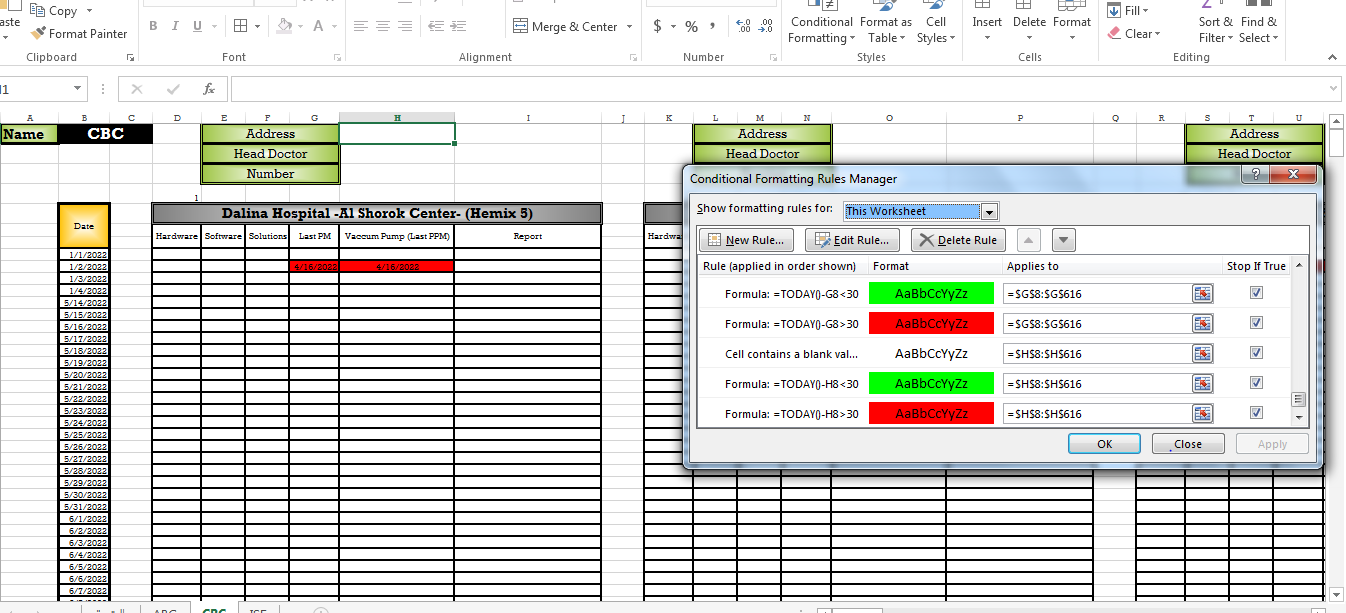
Here i have the exact same condition for specific set of columns each has 3 condition but they all have the same condition with the same parameters
Can i put like comma between the range of the colomn in "applies to" cell or what can i do ?
- Martin_WeissMay 19, 2022Bronze Contributor
Hi HassanBosha
sorry, I was not aware that you are speaking about formatting rules.
What exactly is it, that you need to change in these rules?
Is it the "30" in formula =TODAY-G8<30?
Or what is the parameter that you need to change?
- HassanBoshaMay 19, 2022Copper Contributor
Yes Mainly the 30 in all conditions in all columns that has similar formulas but different column names
- Martin_WeissMay 20, 2022Bronze Contributor
Hi HassanBosha
ok, then I propose you put the variable value 30 in a cell in your worksheet, let's say in A1. And then you have to change the conditional formatting rules to refer to that cell.
So, instead of
=TODAY-G8<30
you write
=TODAY-G8<A1
Of course, it's time consuming to change all rules, but after that, you just need to change the value in A1 and it will be applied to all rules referring to that cell.
- SergeiBaklanMay 19, 2022Diamond Contributor