Forum Discussion

Sales plans workbook
- Apr 06, 2023
Hi Dgosse
2023 CROP Plans
- Each Customer "block" consists of 15 rows followed by 1 empty row
- Deleted empty rows between Customer blocks. Keeping them is not a problem but will cause you a challenge when adding new Customers
- Formatted data as Table
- Hidded the Table HeaderCROP Plans Sorted
- Output of Get & Transform query CustomersSorted where Customers are sorted A-Z
- Table header is hidden
- Conditional format. rule every 16 rowsCustomers by Plan
- Output of Get & Transform query CustomersByPlanHow To use
When you add/change data in 2023 CROP Plans, go to Excel Data (tab) > Refresh All ==> CROP Plans Sorted & Customers by Plan will updateAny question let me know

Hi Dgosse
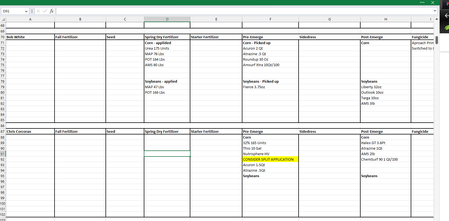
(The setup of your yearly plans sheet isn't ideal and prevents i.e Sorting as you expect + other analysis)
Q1: NO due to all the empty cells in Column A below each Customer name. An option probably exists with Power Query (aka Get & Transform) if you're fine getting a new sheet where the data are sorted
Q2: Probably doable (automatically) with Power Query as well
Questions:
#1 Version of Excel (2016, 2019...365)?
#2 OS/Platform (Windows, Mac...)?
#3 Can you upload & share a representative workbook (w/o sensitive data) instead of pictures?

Hello Lorenzo
Thank you so much for your reply.
- Microsoft Office 2021
- Windows 11 Pro
- Attached (hopefully) is a sample file that is edited down to 10 sample customers. I have manually made the plans table so that it functions mostly the way I want it to, so you can see exactly what i'm trying to get to.
I am not attached to this layout really at all. I just want it to function in those 2 main ways I mentioned before.
Thank you!
https://www.dropbox.com/scl/fi/p7t8h1hlbpiat8v0xvoo9/Customers-PlansEXPERIMENTS.xlsx?dl=0&rlkey=f1n7hpnzcl5blaazrlorn73f7
- LorenzoApr 06, 2023Silver Contributor
Hi Dgosse
2023 CROP Plans
- Each Customer "block" consists of 15 rows followed by 1 empty row
- Deleted empty rows between Customer blocks. Keeping them is not a problem but will cause you a challenge when adding new Customers
- Formatted data as Table
- Hidded the Table HeaderCROP Plans Sorted
- Output of Get & Transform query CustomersSorted where Customers are sorted A-Z
- Table header is hidden
- Conditional format. rule every 16 rowsCustomers by Plan
- Output of Get & Transform query CustomersByPlanHow To use
When you add/change data in 2023 CROP Plans, go to Excel Data (tab) > Refresh All ==> CROP Plans Sorted & Customers by Plan will updateAny question let me know