Forum Discussion

Tbarber
Nov 27, 2020Copper Contributor
running total?
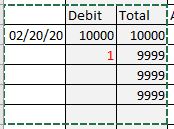
I am using an running total but having trouble to have the Total cell blank until data is entered for that line. This is all because I set the formula for the whole column. See the following example and how can I clear C5 and C6 until data is entered?
Thank you
Tom
3 Replies
- adversiIron Contributor
You will need to apply an IF condition to have the Running Sum blank until a value is inputted. Your new formula would be (starting from the first SUM cell)
=IF(B3="",,SUM($B$3:B3)) TbarberCopper Contributor
That's great thanks, I guessed there would be a IF statement somewhere. Except in the fields where there is not input data yet it places a 0 in Total sum cell. Think there is a way just to have it blank?
Tom