Forum Discussion

Tbarber
Nov 27, 2020Copper Contributor
running total?
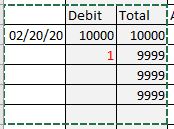
I am using an running total but having trouble to have the Total cell blank until data is entered for that line. This is all because I set the formula for the whole column. See the following example ...


adversi
Nov 27, 2020Iron Contributor
You will need to apply an IF condition to have the Running Sum blank until a value is inputted. Your new formula would be (starting from the first SUM cell)
=IF(B3="",,SUM($B$3:B3))

Tbarber
Nov 27, 2020Copper Contributor
That's great thanks, I guessed there would be a IF statement somewhere. Except in the fields where there is not input data yet it places a 0 in Total sum cell. Think there is a way just to have it blank?
Tom