Forum Discussion

SP3990
Mar 02, 2026Brass Contributor
row count in status bar
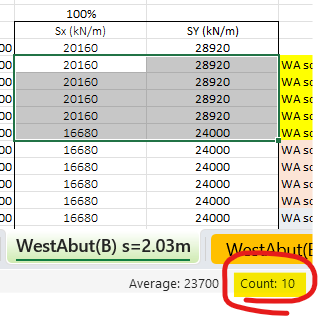
Hi is there a way to show only row or column count in status bar? here it is showing count of total no of cells=10 selected. is it possible to show row count = 5 and column count = 2 separately? ...

Olufemi7
Mar 04, 2026Steel Contributor
Hello SP3990,
No, this is not possible in Microsoft Excel.
The Status Bar only shows summary calculations for the selected cells such as Count, Numerical Count, Sum, Average, Min, and Max. It calculates the total number of selected cells, not separate row and column counts.
There is no built-in option to display row count and column count separately in the Status Bar.
If needed, you can use formulas instead
=ROWS(A1:B5)
=COLUMNS(A1:B5)
Microsoft Support reference
View summary data on the status bar
https://support.microsoft.com/en-us/office/view-summary-data-on-the-status-bar-f42a3ae1-3786-4294-a433-1b36a1c17ebb