Forum Discussion

marcellojek
Nov 07, 2022Copper Contributor
Return value is specific arguments are true
Hi all, I am working on a construction site, where we have to fill out and commit some checklists before we cast the foundations with concrete. I have an Excel sheet with the list of foundations ...

HansVogelaar
Nov 07, 2022MVP
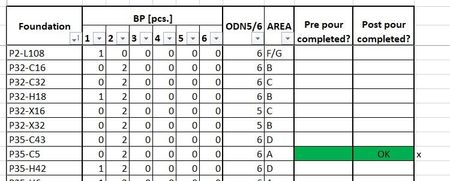
Let's say that P35-C5 is in A10 on the Foundations sheet.
=IFERROR(IF(AND(INDEX(Checklists!$D$4:$D$406;MATCH("*"&A10&"*";CheckLists!$H$4:$H$406;0))="x";INDEX(Checklists!$H$4:$H$406;MATCH("*"&A10&"*";CheckLists!$H$4:$H$406;0))="Finished");"OK";"");"")
This could return an incorrect result if there are foundations named for example P35-C50 or P35-C58. To avoid that, use
=IFERROR(IF(AND(INDEX(Checklists!$D$4:$D$406;MATCH("*"&A10&CHAR(10)&"*";CheckLists!$H$4:$H$406&CHAR(10);0))="x";INDEX(Checklists!$H$4:$H$406;MATCH("*"&A10&"*";CheckLists!$H$4:$H$406;0))="Finished");"OK";"");"")
You may have to confirm the formula by pressing Ctrl+Shift+Enter.