Forum Discussion

Belthax
Jan 27, 2021Copper Contributor
Return last number in a column
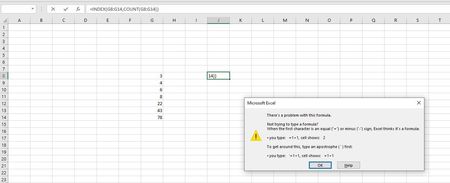
Hello All I am pretty new to excel and i got a problem i cant seem to figure out no matter how many posts about it i have read. Ultimately i want to make excel show me the last number in a ...
- Jan 28, 2021
Do you use comma as decimal separator (e.g. three-and-a-half is 3,5)?
If so, you should use semi-colons instead of commas in the formulas:
=LOOKUP(9,99999999999999E+307;G9:G28)
and
=LOOKUP(2;1/(G:G<>0);G:G)

HansVogelaar
Jan 28, 2021MVP
Use
=LOOKUP(9.99999999999999E+307,G:G)
You can use a finite range instead of the entire column, of course.
The last non-zero number is
=LOOKUP(2,1/(G:G<>0),G:G)
 BelthaxJan 28, 2021Copper Contributor
Thanks for the quick reply.
What im experiencing seems to be something else. Even when i past those formulas they produce the same error as on the picture.
- HansVogelaarJan 28, 2021MVP
Do you use comma as decimal separator (e.g. three-and-a-half is 3,5)?
If so, you should use semi-colons instead of commas in the formulas:
=LOOKUP(9,99999999999999E+307;G9:G28)
and
=LOOKUP(2;1/(G:G<>0);G:G)
- BelthaxJan 28, 2021Copper Contributor