Forum Discussion

Result should be always zero
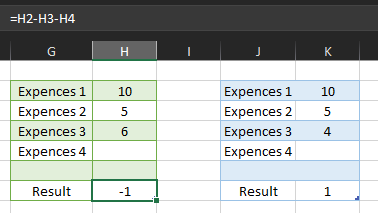

Thank you for quick answer
I think ive asked not correctly so i will refrase
I need, Result (-1) to add in Expences 3 so that Expences 3 will become (5) and Result will be (0)
Same with positive Result

- iLja_bmgsSep 28, 2023Copper Contributor
- LeonPavesicSep 29, 2023Silver Contributor
Hi iLja_bmgs,
To add the negative value of Result to Expenses 3 and show it as Expenses 3, you can use the following formula:
=IF(Result<0,Expenses3+Result,Expenses3)This formula will return the value of Expenses3 plus Result if Result is negative. Otherwise, it will return the value of Expenses3.
For example, if Expenses3 is 5 and Result is -1, then the formula will return 4. If Expenses3 is 5 and Result is 1, then the formula will return 5.
To use this formula, enter it in cell H3, which is the cell where you want to display the updated value of Expenses 3. Then, copy the formula down to the other cells in the Expenses 3 column.
The following table shows how the formula will work for different values of Expenses3 and Result:
Expenses3 Result Formula Result5 -1 4 5 0 5 5 1 5 -5 -1 -6 -5 0 -5 -5 1 -4 You can also use the following formula to show Result as 0 if it is negative:
=IF(Result<0,0,Result)To use this formula, enter it in cell H4, which is the cell where you want to display the updated value of Result. Then, copy the formula down to the other cells in the Result column.
The following table shows how the formula will work for different values of Result:
Result Formula Result-1 0 0 0 1 1 -10 0 10 10
Please click Mark as Best Response & Like if my post helped you to solve your issue.
This will help others to find the correct solution easily. It also closes the item.If the post was useful in other ways, please consider giving it Like.
Kindest regards,
Leon Pavesic
(LinkedIn)
