Forum Discussion

kabeerkhann
Sep 07, 2023Copper Contributor
Replace the value of row to next row of value if meet any condition
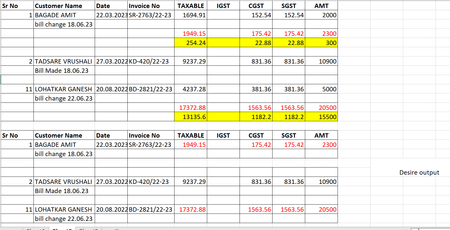
Hey excel family. I am stuck in this issue while summarizing report. What in the sheet is first row is the customer data with its transactions values. Now below the customer there is a bill...
 Sep 07, 2023
=IF(NOT(ISBLANK(A2)),A2,"")A simple solution could be with this formula in cell K2 filled across range K2:N18 in the example.
=IF(AND(ISNUMBER(SEARCH("bill change",$B3)),NOT(ISBLANK($A2))),E4,IF(AND(ISNUMBER(SEARCH("bill made",$B3)),NOT(ISBLANK($A2))),E2,""))This formula is in cell O2 and filled across range O2:S18.
After this you can copy the result and paste only values and then filter and delete the extra blank rows if required.
OliverScheurich
Sep 07, 2023Gold Contributor
=IF(NOT(ISBLANK(A2)),A2,"")A simple solution could be with this formula in cell K2 filled across range K2:N18 in the example.
=IF(AND(ISNUMBER(SEARCH("bill change",$B3)),NOT(ISBLANK($A2))),E4,IF(AND(ISNUMBER(SEARCH("bill made",$B3)),NOT(ISBLANK($A2))),E2,""))This formula is in cell O2 and filled across range O2:S18.
After this you can copy the result and paste only values and then filter and delete the extra blank rows if required.
 kabeerkhannSep 13, 2023Copper ContributorThank you sir i got my answer