Forum Discussion

jpalaci22
Oct 13, 2020Copper Contributor
Reformatting/Changing raw data summed in column/YTD format to row format
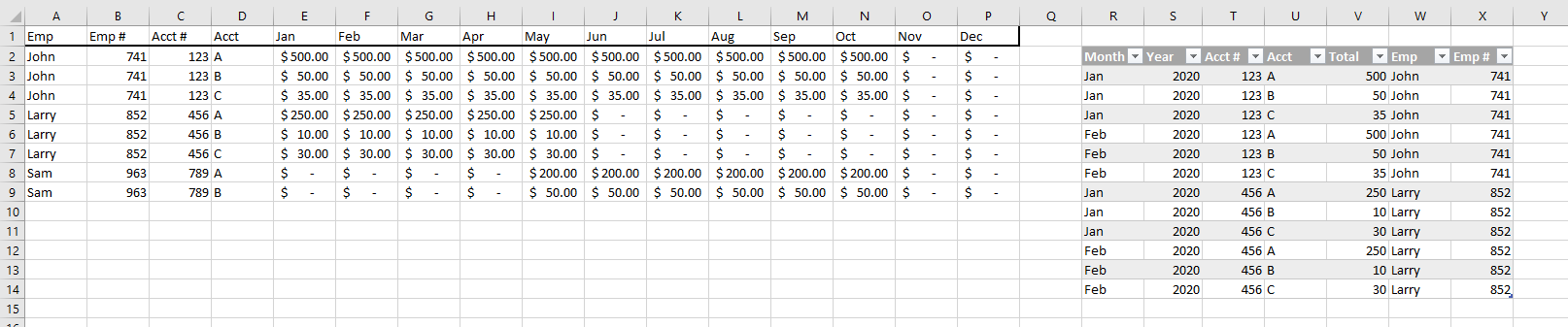
I get my raw data from a payroll provider in this format that is YTD with the months across the columns/ summed across columns. I previously received my raw data the same way I did in the table to the...

SergeiBaklan
Oct 13, 2020Diamond Contributor
In general Power Query shall work especially if you receive your data as Excel/csv/text file. When query the source and unpivot on columns with months. Sorting by proper months order will require some manipulation and not clear from here year 2020 is taken.
Is your source data have exactly the same format / layout as in your sample file and is it in separate file or not?

jpalaci22
Oct 13, 2020Copper Contributor
Hi and thank you for helping out.
This file is a sample with random data. But it comes in that data set format on the left with the table the end result I need it in.
It’s a little busy for me to power through the Power Query LinkedIn Learning course and I really want to understand it so I’m going to make time for it now but I need this data in this format for now.
This file is a sample with random data. But it comes in that data set format on the left with the table the end result I need it in.
It’s a little busy for me to power through the Power Query LinkedIn Learning course and I really want to understand it so I’m going to make time for it now but I need this data in this format for now.
- SergeiBaklanOct 14, 2020Diamond Contributor
Generate by Power Query table is here
entire columns with source data are named as Range. Idea as in previous post.