Forum Discussion

Referencing text in a cell to multiple another cell
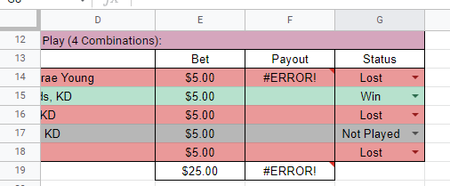

emligh Try this in F14:
=E14*10*(G14="Win")
This trick here is that you always multiply the bet by 10 and then multiply by 1 or 0. The bit G14="Win" returns either TRUE or FALSE, and these represent either 1 or 0. Anything else then Win in G14 will result in 0.
 emlighDec 01, 2022Copper Contributor
I apologize for all the questions.
Is there a way to combine this formula from =F12*10*(H12="Win") to =F12*10*(H12="5/5 Win") =F12*2*(H12="4/5 Win") =F12*0.4*(H12="3/5 Win") all in the same cell?
I tried a handful but I cant seem to figure it out.
- Riny_van_EekelenDec 01, 2022Platinum Contributor
emligh It's not going to be pretty, but if you only have these three option you could use LOOKUP like this:
=F12*LOOKUP(H12,{"3/5 Win","4/5 Win","5/5 Win"},{0.4,2,10})
- emlighNov 30, 2022Copper Contributor
Riny_van_Eekelen That worked! Thank you very much! 🙂
Do you also know a way to make the “Bet” override the manual input of 5 to 0 when the “Status” reads Not Played?
- Riny_van_EekelenNov 30, 2022Platinum Contributor
emligh Thus the the bet is always 5 unless the status is "Not Played"?
If so, you can use a similar approach.
=5*(G14<>"Not Played")