Forum Discussion

Rex-Delson
Apr 01, 2023Tin Contributor
#REF! When referencing cells that constantly change
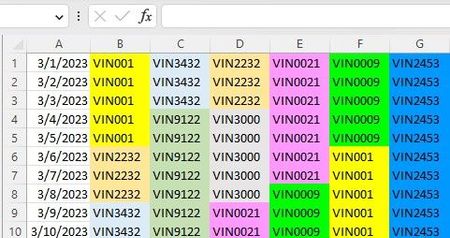
I have Sheet2 cells referencing Sheet1 cells with a simple =Sheet1!B1 formula, but when the cells of Sheet1 are cut/pasted or copy/pasted over, I get #REF! errors. On some instances, I don' get a #RE...

Rex-Delson
Apr 05, 2023Tin Contributor
Thanks for the reply. in this example, C7:10 was cut and pasted into G1:4 in sheet one. It seems like the solution is using the paste special-values , but there's extra steps needed like formatting the color and deleting the copied cells.

mathetes
Apr 05, 2023Gold Contributor
in this example, C7:10 was cut and pasted into G1:4 in sheet one
C7:10 from sheet 2??!! What is supposed to happen with the extra rows intervening in sheet 2? That doesn't seem to make sense to me?
Could you back up a bit and give the full context here, keeping confidential anything that might be confidential, but what is the full process? Are other data sources involved? What ultimately is this about?
- Rex-DelsonApr 08, 2023Tin ContributorThe cut/past was done in sheet 1. Sheet 1 is used as a schedule where jobs fall on a particular day. Sheet 2 is used to mirror sheet 1. The additional row labeled "To Do" is for data for each particular job. This row does not mirror sheet 1 because data is entered manually into the "To Do" rows. The jobs in sheet 1 will constantly move around. Sheet 2 is supposed to keep track of the moving jobs, and herein lies the problem. The cut/paste in sheet 1 messes up sheet 2.
- mathetesApr 08, 2023Gold Contributor
It certainly sounds like the Paste....Special .... Values is what you need to be doing when moving things into or around in Sheet 1 (whether via Copy or Cut).