Forum Discussion

#REF! When referencing cells that constantly change
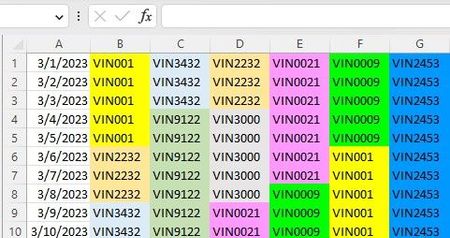

You don't say WHAT you are pasting, what FORM it takes in its origin, and where that ORIGIN is.
You do mention bringing it in as COPY-paste or CUT-paste (that distinction can make a difference sometimes)
What you don't specify, and where I'd go first, is to the matter of how you implement the "paste."
I wonder if you might not be aware of the Paste Special option. In particular, the possibility of selecting "Paste...Values..." And I can't show you that on your attached sheet, because it doesn't include whatever it is that you are pasting that causes the problems in the first place.
Try that and see if it (or one of the other options available there) might be what you need.

- mathetesApr 05, 2023Gold Contributor
in this example, C7:10 was cut and pasted into G1:4 in sheet one
C7:10 from sheet 2??!! What is supposed to happen with the extra rows intervening in sheet 2? That doesn't seem to make sense to me?
Could you back up a bit and give the full context here, keeping confidential anything that might be confidential, but what is the full process? Are other data sources involved? What ultimately is this about?
- Rex-DelsonApr 08, 2023Tin ContributorThe cut/past was done in sheet 1. Sheet 1 is used as a schedule where jobs fall on a particular day. Sheet 2 is used to mirror sheet 1. The additional row labeled "To Do" is for data for each particular job. This row does not mirror sheet 1 because data is entered manually into the "To Do" rows. The jobs in sheet 1 will constantly move around. Sheet 2 is supposed to keep track of the moving jobs, and herein lies the problem. The cut/paste in sheet 1 messes up sheet 2.
- mathetesApr 08, 2023Gold Contributor
It certainly sounds like the Paste....Special .... Values is what you need to be doing when moving things into or around in Sheet 1 (whether via Copy or Cut).