Forum Discussion

Antonino2023
May 25, 2023Brass Contributor
VBA to delete rows whose cell in a column has length zero
Hello, I'm running into an issue on a task that seems fairly simple, but is stumping me nonetheless. It is as follows: In columns A-C I have an Excel Table with some rows (A7, A8, A11, ...
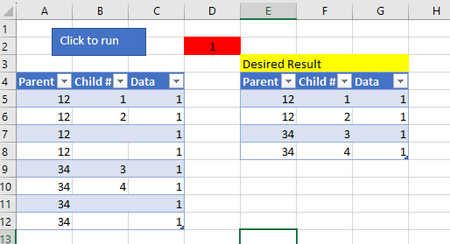
- May 26, 2023
How about
Sub TestDeleteRow()
    Dim wb As Workbook
    Dim ws As Worksheet
    Dim tblTest As ListObject
    Dim ChildNumColumn As Range
    Dim LastRow As Long
    Dim i As Long

    Set wb = ThisWorkbook
    Set ws = wb.Worksheets("Test")
    Set tblTest = ws.ListObjects("Test_T")

    ' Define the table column Data Body Range where we will be checking if the cell's length is 0
    Set ChildNumColumn = tblTest.ListColumns("Child #").DataBodyRange

    LastRow = ChildNumColumn.Rows.Count

    For i = LastRow To 1 Step -1
        If Len(ChildNumColumn.Cells(i).Value) = 0 Then
            tblTest.ListRows(i).Delete
        End If
    Next i
End Sub

HansVogelaar
May 26, 2023MVP
How about
Sub TestDeleteRow()
    Dim wb As Workbook
    Dim ws As Worksheet
    Dim tblTest As ListObject
    Dim ChildNumColumn As Range
    Dim LastRow As Long
    Dim i As Long

    Set wb = ThisWorkbook
    Set ws = wb.Worksheets("Test")
    Set tblTest = ws.ListObjects("Test_T")

    ' Define the table column Data Body Range where we will be checking if the cell's length is 0
    Set ChildNumColumn = tblTest.ListColumns("Child #").DataBodyRange

    LastRow = ChildNumColumn.Rows.Count

    For i = LastRow To 1 Step -1
        If Len(ChildNumColumn.Cells(i).Value) = 0 Then
            tblTest.ListRows(i).Delete
        End If
    Next i
End Sub
Antonino2023
May 26, 2023Brass Contributor
That worked!
Would the source of the prior error be that ChildNumColumn is referencing ListColumns("Child #"), so when I was trying to delete a row in the loop, it was running into an issue where it could not delete the cell in column "Child #" without affecting the other cells in that row? (In the sense that I was trying to delete the entire row in ONLY column "Child #" as opposed to the entire row of the table itself)