Forum Discussion

unpivot data and handle merged cells without using Power Query (Unpivot_Toolkit)
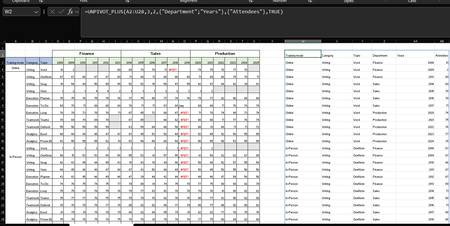

Looks impressive!
A useful step towards providing new calculation options.
- My first choice might be to use array formulas directly on the data objects held within your crosstab
- The next might be to use your 'souped up' unpivot followed by database-style aggregations
- Repivot to form a new crosstab with the restructured arrays for calculation
Choice is good.
 Medohh2120Mar 22, 2026Copper Contributor
Thanks, Peter! Really appreciate the kind words and the thoughtful breakdown.
I'll be honest. Your three points are a little open-ended, so I may not be reading them exactly as intended! But if I'm on the right track, here's how they map to some design decisions I made along the way:
On option 1. it's definitely the most intuitive approach, and honestly the most Excel-native one. The catch I ran into is performance. Once fill-down/fill-right logic is a part of the formula chain, recalculation overhead grows noticeably compared to working against a plain range reference. I benchmarked this across a few scenarios using a custom LAMBDA benchmark tool, and the difference was significant (x2 slower).
I even update the function to use INDEX instead of CHOOSEROWS/COLS to return references not arrays and got 2 sec boost in worst case scenarios. I'm not entirely sure why, but the numbers don't lie.
On options 2 & 3. if you're pointing toward aggregation and re-pivoting as natural next steps after unpivoting, then totally agree. I am happy to make a separate version of PIVOT/GROUPBY that integrates perfectly with UNPIVOT_PLUS without DROP/TAKE Headache soon. UNPIVOT_PLUS is already sitting at 9 parameters (PIVOTBY is at 11), which I feel is the upper limit before users start bouncing off it (though I know that's no issue for power users).
Integrating both into one will be a whopping 20-parameter machine!
If I've misread any of this, feel free to correct me. Always happy to dig deeper! And yes, choice is indeed good.