Forum Discussion

Top n vs. Others in Excel
- Feb 04, 2026
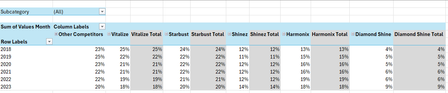
Thank you very much for providing the full context. Looking at the chart I better understand what Your challenge was 🤔
The attached option uses the same approach we've been discussing these last days. In summary:
- TableSource is filtered by the Slicer(s)
- PIVOTBY calc. the %age by [Year] & [Brand] relative to the Row Total. Data are sorted DESC according to [Brand] "best Total"
- The formula (below):
- Takes the PIVOTBY resulting array to Group [Brand] above - if any - the TOPN parameter
- Padds the [Brand] left with the appropriate number of Zero Width Space chars. to ensure [Brand] will be ordered according to there rank in the PivotTable & Chart, with [Grouped Brand] always as the last [Brand] whatever its rank is
- Unpivots the data as a single array that's used as PivotTable Data Source
PivotTable
- [Brand] must be sorted A-Z
- Until MSFT releases the PivotTable Auto Refresh functionality, any change on the Slicer(s) requires a Refresh of the PivotTable
Side effect of the Zero Width Spaces
- None on screen
- According to my researches none on printing - to be checked though...
- [Brand] on PivotTable/Chart <> TableSource[Brand]*
* I will provide more information on a separate post later
Formula
I did my best to make the variable names as clear as possible and decomposed as much as possible - any question let me know:
// Source_PivotTable
=LET(
  TOPN_value,         IF( ISBLANK( SETTINGS!TOPN_Default ), 5, SETTINGS!TOPN_Default ),
  GROUPED_BrandName,  IF( ISBLANK( SETTINGS!TOPN_GROUPED_Names ), "Other Brands", SETTINGS!TOPN_GROUPED_Names ),

  pivotedAllBrands,
    PIVOTBY(
      TableSource[Year], TableSource[Brand], TableSource[Values Month],
      PERCENTOF,
      0, 0, 1, 0, -2,
      TableSource[NOT_Filtered],
      1
    ),

  OtherBrand_Exists?,           COLUMNS( pivotedAllBrands) -1 > TOPN_value,
  groupedOtherBrand_If_Exists,
    IF( OtherBrand_Exists?,
      LET(
          TopnBrand_series,     CHOOSECOLS( pivotedAllBrands, SEQUENCE(, TOPN_value, 2 ) ),
          TopnBrand_values,     DROP( TopnBrand_series, 1 ),
          GroupedBrand_values,  BYROW( TopnBrand_values, LAMBDA(rw, 1 -SUM(rw) ) ),
          AllBrand_series,      VSTACK(
                                  HSTACK( TAKE( TopnBrand_series, 1 ), GROUPED_BrandName ),
                                  HSTACK( TopnBrand_values, GroupedBrand_values )
                                ),
          AllBrand_series
      ),
      pivotedAllBrands
    ),

       prep_UnPivoting_BEG,  "------------------------------------------------------",
            LeftCol_ToDrop,   --NOT( OtherBrand_Exists? ),
                brandNames,   DROP( TAKE( groupedOtherBrand_If_Exists, 1 ),, LeftCol_ToDrop ),
                brandCount,   COLUMNS( brandNames ),
           brandRanks_Desc,   SEQUENCE(, brandCount, brandCount, -1 ),
          paddedBrandNames,   REPT( UNICHAR(8203), brandRanks_Desc ) & brandNames,
                     years,   DROP( TAKE( pivotedAllBrands,, 1 ), 1 ),
                    values,   DROP( groupedOtherBrand_If_Exists, 1, LeftCol_ToDrop ),
            valuesNotBlank,   NOT( ISBLANK( values ) ),
       prep_UnPivoting_END,  "------------------------------------------------------",

    UnPivotedData,
      LET(
        UnPivot,            LAMBDA(array, TOCOL( IF( valuesNotBlank, array ) ) ),
        UnPivoted_years,    UnPivot( years ),
        UnPivoted_brands,   UnPivot( paddedBrandNames ),
        UnPivoted_values,   TOCOL( values ),
        HSTACK( UnPivoted_years, UnPivoted_brands, UnPivoted_values )
      ),

  VSTACK( {"Year", "Brand", "Value"}, UnPivotedData )
)
Cheers
Lz.

Thank you very much for providing the full context. Looking at the chart I better understand what Your challenge was 🤔
The attached option uses the same approach we've been discussing these last days. In summary:
- TableSource is filtered by the Slicer(s)
- PIVOTBY calc. the %age by [Year] & [Brand] relative to the Row Total. Data are sorted DESC according to [Brand] "best Total"
- The formula (below):
- Takes the PIVOTBY resulting array to Group [Brand] above - if any - the TOPN parameter
- Padds the [Brand] left with the appropriate number of Zero Width Space chars. to ensure [Brand] will be ordered according to there rank in the PivotTable & Chart, with [Grouped Brand] always as the last [Brand] whatever its rank is
- Unpivots the data as a single array that's used as PivotTable Data Source
PivotTable
- [Brand] must be sorted A-Z
- Until MSFT releases the PivotTable Auto Refresh functionality, any change on the Slicer(s) requires a Refresh of the PivotTable
Side effect of the Zero Width Spaces
- None on screen
- According to my researches none on printing - to be checked though...
- [Brand] on PivotTable/Chart <> TableSource[Brand]*
* I will provide more information on a separate post later
Formula
I did my best to make the variable names as clear as possible and decomposed as much as possible - any question let me know:
// Source_PivotTable
=LET(
  TOPN_value,         IF( ISBLANK( SETTINGS!TOPN_Default ), 5, SETTINGS!TOPN_Default ),
  GROUPED_BrandName,  IF( ISBLANK( SETTINGS!TOPN_GROUPED_Names ), "Other Brands", SETTINGS!TOPN_GROUPED_Names ),

  pivotedAllBrands,
    PIVOTBY(
      TableSource[Year], TableSource[Brand], TableSource[Values Month],
      PERCENTOF,
      0, 0, 1, 0, -2,
      TableSource[NOT_Filtered],
      1
    ),

  OtherBrand_Exists?,           COLUMNS( pivotedAllBrands) -1 > TOPN_value,
  groupedOtherBrand_If_Exists,
    IF( OtherBrand_Exists?,
      LET(
          TopnBrand_series,     CHOOSECOLS( pivotedAllBrands, SEQUENCE(, TOPN_value, 2 ) ),
          TopnBrand_values,     DROP( TopnBrand_series, 1 ),
          GroupedBrand_values,  BYROW( TopnBrand_values, LAMBDA(rw, 1 -SUM(rw) ) ),
          AllBrand_series,      VSTACK(
                                  HSTACK( TAKE( TopnBrand_series, 1 ), GROUPED_BrandName ),
                                  HSTACK( TopnBrand_values, GroupedBrand_values )
                                ),
          AllBrand_series
      ),
      pivotedAllBrands
    ),

       prep_UnPivoting_BEG,  "------------------------------------------------------",
            LeftCol_ToDrop,   --NOT( OtherBrand_Exists? ),
                brandNames,   DROP( TAKE( groupedOtherBrand_If_Exists, 1 ),, LeftCol_ToDrop ),
                brandCount,   COLUMNS( brandNames ),
           brandRanks_Desc,   SEQUENCE(, brandCount, brandCount, -1 ),
          paddedBrandNames,   REPT( UNICHAR(8203), brandRanks_Desc ) & brandNames,
                     years,   DROP( TAKE( pivotedAllBrands,, 1 ), 1 ),
                    values,   DROP( groupedOtherBrand_If_Exists, 1, LeftCol_ToDrop ),
            valuesNotBlank,   NOT( ISBLANK( values ) ),
       prep_UnPivoting_END,  "------------------------------------------------------",

    UnPivotedData,
      LET(
        UnPivot,            LAMBDA(array, TOCOL( IF( valuesNotBlank, array ) ) ),
        UnPivoted_years,    UnPivot( years ),
        UnPivoted_brands,   UnPivot( paddedBrandNames ),
        UnPivoted_values,   TOCOL( values ),
        HSTACK( UnPivoted_years, UnPivoted_brands, UnPivoted_values )
      ),

  VSTACK( {"Year", "Brand", "Value"}, UnPivotedData )
)
Cheers
Lz.
Hi Anonymous29007
A friend of mine with a different issue is also concerned about the unavailability of the Pivot Auto Refresh functionality. In the meantime she wanted a visual flag to remind users to Refresh the PivotTable when required. It's been implemented with a Green/Red icon above the PivotTable:
Due to the hack we put in place to sort the [Brand] as expected on the PivotTable the above solution requires a little customization. Before I spend time on this, are you interested?
If you are I need to know if you made changes - other than updating your data in TableSource - to the last wbook I shared (PivotChart_v2).
Let me know…
Lz.
 Anonymous29007Feb 12, 2026Brass Contributor
Hi Lorenzo ,
I'm so sorry for responding late. This didn't show up in my notifications and it only came in my email today.
Yes, I'd love to learn more about this. In fact I was thinking about the Pivot Auto refresh earlier this week and I think it would be a great idea to have some visual cue reminding the user to refresh.
I haven't made any changes to the workbook (PivotChart_v2) that you sent.
Definitely eager to learn more...
Best regards,
YP
- LorenzoFeb 12, 2026Silver Contributor
Hi Anonymous29007 / YP
I'm so sorry for responding late. This didn't show up in my notifications
No worries at all (this site currently bugs on file attachments & notifications)
- Defined Name 'PivotBrands' that refers to the top-left cell of the PivotTable (also renamed PivotBrands)
- For clarity/alignment, renamed 'Source_PivotTable' as 'Source_PivotBrands'
- On CALCS!F4 an on-sheet LAMBDA named 'PivotBrands_Refresh_Status'
- (Done on UI sheet) Wherever you want enter =PivotBrands_Refresh_Status & copy/paste special the format* (only) from CALCS!F4 (* Conditional Format w/Icon Set)
NB: this doesn't prevent you from renaming the sheets
PivotBrands_Refresh_Status:
=LAMBDA(pivot_table,pivot_data_source,
  LET(
    ASSUMPTION_1,   "Only 1 row_field and only 1 column field in 'DataSource' are Pivoted.",
    ASSUMPTION_2,   "The same 'col_field_name' is used in 'DataSource' & 'pivot_data_source'.",

    Pivoted_DataSource,
      LET(
         PivotSource_array, DROP(pivot_data_source, 1),
                   pivoted, PIVOTBY( CHOOSECOLS(PivotSource_array, 1), CHOOSECOLS(PivotSource_array, 2), CHOOSECOLS(PivotSource_array, 3),
                             SUM, 0, 0, 1, 0, -2
                            ),
           SPECIFIC_CUSTOM, "Actual pivot_table Headers are preceded w/Zero Width Spaces to push 'TOPN_GROUPED_Names' at end.",
           cleaned_headers, SUBSTITUTE( TAKE(pivoted, 1), UNICHAR(8203), ""),
             initial_order, SEQUENCE(, COLUMNS(pivoted) ),
              custom_order, IF( cleaned_headers = SETTINGS!TOPN_GROUPED_Names, MAX(initial_order), initial_order -1),
         SORTBY( pivoted, custom_order )
      ),
    Row_fields_count, ROWS(Pivoted_DataSource) -1,

    Col_fields_count,
      LET(
                 DataSource,  TableSource[#All],
               data_headers,  TAKE(DataSource, 1),
        data_col_field_name,  INDEX(pivot_data_source, 1, 2),
       data_col_field_index,  XMATCH(data_col_field_name, data_headers),
       ROWS( UNIQUE( CHOOSECOLS( DROP(DataSource, 1), data_col_field_index) ) )
      ),

   PivotTableAs_array,
     LET(
         PivotStart_address,  CELL("address", pivot_table),
            pivot_start_row,  VALUE( REGEXEXTRACT(PivotStart_address, "(?<=\$)\d+$" ) ),
            pivot_start_col,  COLUMN( INDIRECT( REGEXEXTRACT(PivotStart_address, "(?<=\$)[^$]+(?=\$)" ) & "1" ) ),
          Pivot_ASSUMPTIONS,  "No field in Filters area & 1 field in Rows area",
              pivot_end_row,  pivot_start_row +1 +Row_fields_count,
      pivot_max_bottom_addr,  ADDRESS(pivot_end_row, pivot_start_col +Col_fields_count),
       pivot_max_used_range,  INDIRECT( TEXTJOIN(":",, PivotStart_address, pivot_max_bottom_addr) ),
            array_resized_V,  DROP(pivot_max_used_range, 1),
            array_resized_H,  FILTER(array_resized_V,
                                MMULT( SEQUENCE(, Row_fields_count +1), --NOT( ISBLANK(array_resized_V) ) )
                              ),
      IF( TAKE(array_resized_H, 1, 1) = "", array_resized_H,
        VSTACK( HSTACK( "", DROP( TAKE(array_resized_H, 1),, 1) ), DROP(array_resized_H, 1) )
      )
    ),

   OUTPUT,  "1 if pivot_table is up to date, 0 otherwise",
   N( SUM( TOCOL(--(PivotTableAs_array = Pivoted_DataSource), 2) ) = COUNTA(Pivoted_DataSource) )
 )
)(PivotBrands, Source_PivotBrands)
Any question let me know
Cheers
Lz.- Anonymous29007Feb 13, 2026Brass Contributor
Hi Lorenzo,
Thank you so much for this improvement. It works well on my end.
I never knew this challenge would be appear deceptively simple 😅. I truly learnt a lot from how you approached this and it's given me a newfound interest for advanced Excel. Thank you for sparking my interest in advanced Excel.
Your time, dedication and passion for solving these problems, truly amazes me. Some day, I wish I could be half of the exceptional problem solver you are 😀.
Thank you so much once again!
Kind regards,
YP