Forum Discussion

Time sheet for hours worked
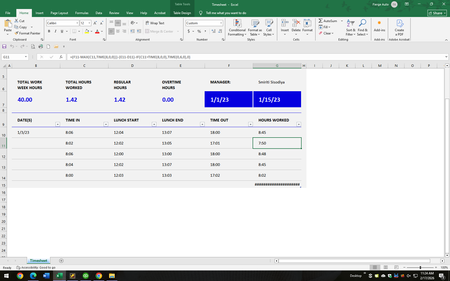

Sorry - wasn't sure how to word everything. So we round the total hours worked for each day to the nearest tenth of an hour. Here is an example -
Clocked in 8:00AM
Lunch out 12:00PM
Lunch in 1:21PM
Clocked out 5:00PM
Totals to 7.6
I am hoping there is a formula for excel that will give me that exact answer. Thank you :)

You wrote:
Sorry - wasn't sure how to word everything. <snip, snip, snip>
I am hoping there is a formula for excel that will give me that exact answer.
One of the things I've learned through decades of using Excel (and, going back to the 1970s, many of the other spreadsheet programs that are strewn along the roadside of the computer age) is that "If I think [Excel} should be able to do [X] , it can. I just need to figure out how the wizards behind it made it possible." In other words, you don't ever need to "hope" that there is a formula to do whatever it is that you want it to. There is such a formula; probably two or three.
The challenge is to play around with the various tools until you find one of what will undoubtedly be several different ways to get from A to B. I use the word "play" very deliberately. Give yourself permission to dabble, to experience trial and error, to learn from mistakes. That is truly the best way to learn Excel (as it is many other skills).
And then there's the aspect of wording--let's say "describing" instead. One key step in the process is to come up with a clear and comprehensive description in English (not computerese) of the task at hand. Generally, once we have a complete and clear description of the task (input, what to do with the input, output desired) the rest falls into place, maybe, as noted above, with a bit of playing around to find which route from A to B is the most efficient.
So have at it, my friend. Here's a website I still use frequently to help me find new Excel toys to play with.