Forum Discussion

Time sheet for hours worked
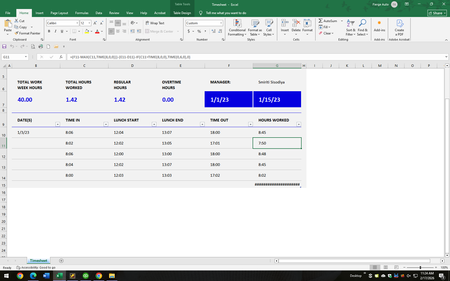

It may be clear to you what "we do things in 6 minute increments" means in this context. I know what the phrase means--and am assuming it is convenient because it refers to tenths of an hour--but you don't make clear how you're using it (or hoping to use it) in tracking time. Here are the possibilities that occur to me. Does it mean you:
- round each entry to the nearest tenth of an hour
- round each segment of clocked in to clocked out to the nearest tenth of an hour
- only round the final total "Hours Worked" to the nearest tenth of an hour
- something else?
 raqim88Feb 17, 2026Copper Contributor
You can just calculate morning time plus afternoon time, then round it. For example, total hours = (lunch out − clock in) + (clock out − lunch in). Then round that result to 6-minute increments using MROUND. After that, sum your daily totals for the week. Make sure the cells are formatted as time so it calculates correctly. This setup usually works for simple timesheets.
 Llamaface06Feb 17, 2026Copper Contributor
Sorry - wasn't sure how to word everything. So we round the total hours worked for each day to the nearest tenth of an hour. Here is an example -
Clocked in 8:00AM
Lunch out 12:00PM
Lunch in 1:21PM
Clocked out 5:00PM
Totals to 7.6
I am hoping there is a formula for excel that will give me that exact answer. Thank you :)
- NikolinoDEFeb 20, 2026Platinum Contributor
Here's a small attempt, maybe this will help you.
That calculates total hours worked with 6-minute increments (rounded to the nearest tenth of an hour).
=FLOOR(( (Clock_Out - Clock_In) - (Lunch_Out - Lunch_In) ) * 24, 0.1)
Example Breakdown:
- Clock_In: 8:00 AM (0.3333 in Excel)
- Lunch_Out: 12:00 PM (0.5)
- Lunch_In: 1:21 PM (0.55625)
- Clock_Out: 5:00 PM (0.70833)
Calculation:
=FLOOR(( (0.70833 - 0.3333) - (0.55625 - 0.5) ) * 24, 0.1)
=FLOOR(7.65, 0.1)
= 7.6
Ensure cells are formatted as [h]:mm to display time correctly.
- Llamaface06Feb 23, 2026Copper Contributor
Ok so here is how the lady leaving figured out one persons time card
Clocked in 10:11AM
Clocked out 2:57 PM
No Lunch = 4.7 hours
or another example with a lunch
Clocked in 9:04 AM
Clocked out lunch 12:00 PM
Clocked in lunch 12:30 PM
Clocked out 5:01 PM
= 7.4 hours
Our work hours are 8am to 5pm
- mathetesFeb 18, 2026Gold Contributor
Could I just give you a few words of encouragement, based on (believe it or not) 50 years of working with arrays of data, most of that time with spreadsheets as the primary tool.
You don't ever need to "hope" that there's a formula to get from A to B. Quite seriously. A rule of thumb that I developed many years ago, first for myself, then for others who were still learning: IF you find yourself thinking along the lines "Excel should be able to ________" THEN you can be confident that the programmers have indeed made it possible. The challenge is to find the function or functions that make it possible.
Related to that rule of thumb is the reality that you do need to find a comprehensive and clear way to describe the situation, thinking of these three stages: input, process, output. Rather than kicking yourself for "not sure how to word everything" think of it as describing, especially describing fully the process aspect. And focus on describing in plain English (no need to try to translate into "computerese" or "Excel functions"; that comes later).
Usually, once you've described the input, process, and output--your original description here had the first and last parts of that trio; it just left vague the process itself--it becomes relatively easy to find an Excel solution because the names of the functions themselves are close enough to English descriptions of what they do that you can go down a comprehensive list of functions and start playing with them to see if they get you from A to B.
Let me also underscore my use of the word "play" in that last sentence. Give yourself permission to go through trial and error. Play. You won't break anything and you will learn.
- mathetesFeb 18, 2026Gold Contributor
You wrote:
Sorry - wasn't sure how to word everything. <snip, snip, snip>
I am hoping there is a formula for excel that will give me that exact answer.
One of the things I've learned through decades of using Excel (and, going back to the 1970s, many of the other spreadsheet programs that are strewn along the roadside of the computer age) is that "If I think [Excel} should be able to do [X] , it can. I just need to figure out how the wizards behind it made it possible." In other words, you don't ever need to "hope" that there is a formula to do whatever it is that you want it to. There is such a formula; probably two or three.
The challenge is to play around with the various tools until you find one of what will undoubtedly be several different ways to get from A to B. I use the word "play" very deliberately. Give yourself permission to dabble, to experience trial and error, to learn from mistakes. That is truly the best way to learn Excel (as it is many other skills).
And then there's the aspect of wording--let's say "describing" instead. One key step in the process is to come up with a clear and comprehensive description in English (not computerese) of the task at hand. Generally, once we have a complete and clear description of the task (input, what to do with the input, output desired) the rest falls into place, maybe, as noted above, with a bit of playing around to find which route from A to B is the most efficient.
So have at it, my friend. Here's a website I still use frequently to help me find new Excel toys to play with.
