Forum Discussion

Kendethar
Aug 14, 2022Iron Contributor
SOLVED - Hyperlink function works as Flash Fill but not as Dynamic/spill array
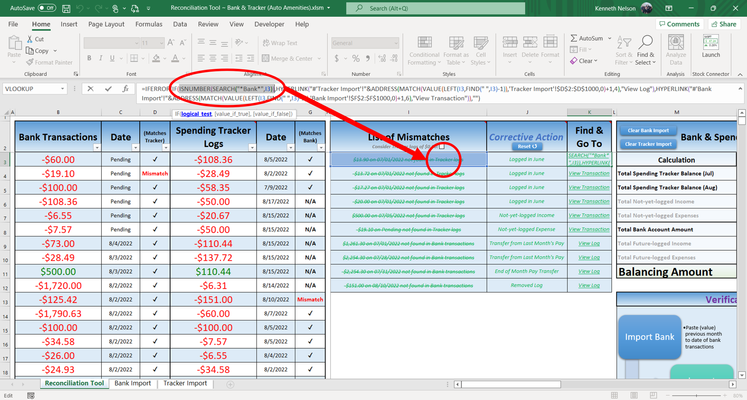
Hello all, I have tracker logs that I'm comparing to my bank and have solved all the issues so far, except for how to spill my Find & Go To hyperlink function. I have a complex formula in ran...
 Aug 15, 2022
After further investigation, the basic problem with extending the formula given in the post to a dynamic array seems to be that HYPERLINK doesn't accept arrays in both arguments simultaneously.
Instead maybe try making a single HYPERLINK formula that uses relative referencing,
=IF(I3:I1000="","",HYPERLINK(
LET(x,ISNUMBER(SEARCH("Bank",@I3:I1000)),
    y,VALUE(LEFT(@I3:I1000,FIND(" ",@I3:I1000)-1)),
    z,IF(x,'Tracker Import'!$D$2:$D$1000,'Bank Import'!$F$2:$F$1000),
    IF(x,"#'Tracker Import'!","#'Bank Import'!")&ADDRESS(MATCH(y,z,0)+1,IF(x,4,6))),
IF(ISNUMBER(SEARCH("Bank",I3:I1000)),"View Log","View Transaction")))
(note this may require clicking "No" in the compatibility checker after entry)
Another possibility that avoids the use of @ could be:=IF(I3:I1000="","",HYPERLINK( "#LET(x,ISNUMBER(SEARCH(""Bank"",rc9)), y,VALUE(LEFT(rc9,FIND("" "",rc9)-1)), z,IF(x,'Tracker Import'!r2c4:r1000c4,'Bank Import'!r2c6:r1000c6), XLOOKUP(y,z,z))", IF(ISNUMBER(SEARCH("Bank",I3:I1000)),"View Log","View Transaction")))

gkarthick
Aug 15, 2024Copper Contributor
Terrific lori_m ! This made my day !
Wonder how HYPERLINK() adapts to spill capability with RC reference style, but does not seem to work, atleast for me, when I use the regular A1 reference style.
Wonder how HYPERLINK() adapts to spill capability with RC reference style, but does not seem to work, atleast for me, when I use the regular A1 reference style.

Kendethar
Aug 16, 2024Iron Contributor
Yeah, that was the issue I initially posted about because the way I wrote the formula should've technically worked (A1 syntax and the math) but didn't for whatever reason. The way Excel's C++ code was written for the =HYPERLINK() function I'd imagine.