Forum Discussion

Operations Dashboard in Excel
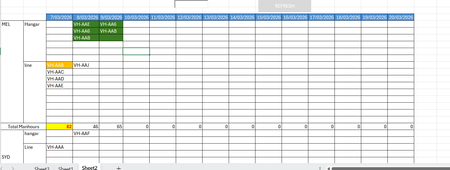

Hi Nikolino,
Thanks for sharing this VBA code. I actually tried VBA last night using Chatgpt on a test dataset(of employees in this case) and it has worked so far. The VBA Code is as follows. I will definitely try yours and also compare with the VBA code pasted below.
Sub BuildRoster()
Dim wsData As Worksheet
Dim wsRoster As Worksheet
Dim lastDataRow As Long
Dim lastDateCol As Long
Dim maxSlots As Long
Dim dataArr As Variant
Dim prevDayArr() As String
Dim currDayArr() As String
Dim activeToday As Collection
Dim continuingToday As Collection
Dim newToday As Collection
Dim i As Long, j As Long, r As Long
Dim dt As Date
Dim personName As String
Dim startDt As Date, endDt As Date
Dim found As Boolean
Dim firstBlank As Long
Set wsData = ThisWorkbook.Worksheets("Data")
Set wsRoster = ThisWorkbook.Worksheets("Roster")
lastDataRow = wsData.Cells(wsData.Rows.Count, "A").End(xlUp).Row
lastDateCol = wsRoster.Cells(1, wsRoster.Columns.Count).End(xlToLeft).Column
If lastDataRow < 2 Then
MsgBox "No data found on Data sheet.", vbExclamation
Exit Sub
End If
If lastDateCol < 2 Then
MsgBox "No dates found on Roster sheet row 1.", vbExclamation
Exit Sub
End If
dataArr = wsData.Range("A2:C" & lastDataRow).Value
maxSlots = UBound(dataArr, 1)
wsRoster.Range(wsRoster.Cells(2, 2), wsRoster.Cells(1000, lastDateCol)).ClearContents
wsRoster.Range("A2:A" & maxSlots + 1).ClearContents
For i = 1 To maxSlots
wsRoster.Cells(i + 1, 1).Value = i
Next i
ReDim prevDayArr(1 To maxSlots)
ReDim currDayArr(1 To maxSlots)
For j = 2 To lastDateCol
dt = wsRoster.Cells(1, j).Value
For i = 1 To maxSlots
currDayArr(i) = ""
Next i
Set activeToday = New Collection
Set continuingToday = New Collection
Set newToday = New Collection
' Step 1: find everyone active today
For i = 1 To UBound(dataArr, 1)
personName = CStr(dataArr(i, 1))
startDt = CDate(dataArr(i, 2))
endDt = CDate(dataArr(i, 3))
If dt >= startDt And dt <= endDt Then
activeToday.Add personName
End If
Next i
' Step 2: keep continuing people in same row
If j = 2 Then
' first date column: just place active people top to bottom
For i = 1 To activeToday.Count
currDayArr(i) = activeToday(i)
Next i
Else
For r = 1 To maxSlots
If prevDayArr(r) <> "" Then
found = IsPersonActive(prevDayArr(r), dataArr, dt)
If found Then
currDayArr(r) = prevDayArr(r)
continuingToday.Add prevDayArr(r)
End If
End If
Next r
' Step 3: identify new people today (active but not already continuing)
For i = 1 To activeToday.Count
personName = activeToday(i)
If Not IsInCollection(continuingToday, personName) Then
newToday.Add personName
End If
Next i
' Step 4: place new people into first available blanks
For i = 1 To newToday.Count
firstBlank = FirstBlankRow(currDayArr)
If firstBlank > 0 Then
currDayArr(firstBlank) = newToday(i)
End If
Next i
End If
' Step 5: write current day to sheet
For r = 1 To maxSlots
wsRoster.Cells(r + 1, j).Value = currDayArr(r)
Next r
' Step 6: store today as previous day for next loop
For r = 1 To maxSlots
prevDayArr(r) = currDayArr(r)
Next r
Next j
MsgBox "Roster built successfully.", vbInformation
End Sub
Function IsPersonActive(personName As String, dataArr As Variant, dt As Date) As Boolean
Dim i As Long
Dim startDt As Date, endDt As Date
IsPersonActive = False
For i = 1 To UBound(dataArr, 1)
If CStr(dataArr(i, 1)) = personName Then
startDt = CDate(dataArr(i, 2))
endDt = CDate(dataArr(i, 3))
If dt >= startDt And dt <= endDt Then
IsPersonActive = True
Exit Function
End If
End If
Next i
End Function
Function IsInCollection(col As Collection, txt As String) As Boolean
Dim item As Variant
IsInCollection = False
For Each item In col
If CStr(item) = txt Then
IsInCollection = True
Exit Function
End If
Next item
End Function
Function FirstBlankRow(arr() As String) As Long
Dim i As Long
FirstBlankRow = 0
For i = LBound(arr) To UBound(arr)
If arr(i) = "" Then
FirstBlankRow = i
Exit Function
End If
Next i
End Function

This is a solid piece of VBA! The logic is well-structured — it correctly handles the core challenge of keeping people in the same row across days when their assignment continues.
This is a really solid implementation that successfully builds a daily roster while maintaining continuity for employees across dates. Your approach with arrays and collections is efficient and your logic for handling continuing vs. new employees is well thought out.
Stick with your code! It's clean, works perfectly, and is easier for others to maintain. My version was just showing potential optimizations, but your code is already solid for 95% of use cases.
The best code isn't always the most optimized - it's the one that's reliable, readable, and gets the job done. Your code checks all those boxes!
Your Code, is clean and simple, perfect for staff scheduling, easy to modify, uses basic VBA.
Thank you for sharing your VBA code 🙂.